


The attack starts with junk emails and a Teams call from fake IT support. The victim is tricked into opening a Quick Assist session, allowing the attacker to install a disguised version of Nimbus RAT. The malware takes commands from Google Drive and Sheets and uses Microsoft Teams relay servers to access the network. TENEX.AI Detection Engineering has developed detection rules and is actively hunting for this activity across customer environments. When we find evidence of impact, we investigate and contact the customer directly. Here is what we found.
Key Takeaways
- The case we analyzed started with email bombing and a Microsoft Teams call from an external account posing as IT support, and the caller then used Quick Assist to install
EmailWizardFlow.jar, a new, heavily obfuscated build of Nimbus RAT that comes with its own copy of OpenJDK. - The RAT gets its commands from Google Drive and Google Sheets through Google Cloud service accounts the attacker controls, so all of its command and control traffic goes to Google APIs.
- The operator loaded its tools into memory as modules, and one of them, TR, turned the infected host into a SOCKS5 proxy that could only be reached through Microsoft Teams relay servers, so the operator's traffic into the network looked like ordinary Teams media traffic.
- The operator then deployed BrokerSiphon, a data theft tool that takes Microsoft Entra ID tokens from the Windows token broker cache and uses them to download the user's OneDrive, SharePoint and Teams files without the password or an MFA prompt and upload them to a Microsoft 365 tenant the attacker controls.
- The oldest BrokerSiphon build,
jl60.jar, is also a file encryptor and the operator staged it with a ransom note adapted from The Gentlemen ransomware operation and with encryption switched off in its configuration. - We assess with moderate confidence that the threat actor is a Gentlemen affiliate that brings its own access and tools and uses the group's note and leak site for the extortion step.
- Later in this research we also look at an unrelated campaign that hides a Deno backdoor behind a fake Windows update and builds a complete remote access toolkit from a signed Deno runtime and four obfuscated scripts.
How TENEX.AI Responded
Our Detection Engineering team has developed detection rules for the activity described in this research, and we have been hunting customer environments for the same activity, using the indicators and behaviors covered here. When we find evidence of impact, we investigate and reach out to the customer directly.
What Happened
TENEX.AI has been tracking an operator whose intrusions follow a playbook many defenders will recognize by now: a wave of email bombing, then an attacker posing as IT support who reaches the user through an external Microsoft Teams chat and call, opens a Quick Assist session, and uses it to install a folder named EmailWizardFlow under C:\ProgramData. That folder held a Java archive, EmailWizardFlow.jar, along with a complete copy of Oracle OpenJDK 26.0.1 to run it, and that bundled runtime turns out to matter a lot for how the malware protects itself.
EmailWizardFlow.jar is a new build of Nimbus RAT, a Java remote access trojan (RAT) that Rapid7 reported without a name in June 2025 and eSentire named and documented in May 2026. It takes its commands from files in Google Drive folders owned by attacker-controlled Google Cloud service accounts, so in this build its command and control runs entirely over Google Drive and Google Sheets, with the one exception of the fallback configuration URL that the spreadsheet can point anywhere. The build we analyzed differs from the earlier public reporting in ways that matter to defenders, and because we could follow the case from the first call all the way to the data theft, it also exposed parts of the operation that the earlier reporting does not cover.
The most recent public reporting described this family's obfuscation as light, so we expected a fairly easy read, but that is not what we got. This build encrypts all 412 of its strings, flattens its control flow, and keeps its command words only as hash values, which means neither the C2 configuration nor a single command name appears in plaintext anywhere in the RAT's own code.
It also refuses to start unless a file named terms.txt exists in the bin folder of the Java runtime that launched it, and the check is for existence only, not for size or content. A standard JDK does not include that file, so the operator added an empty one to the bundled JDK, and under any other Java runtime of version 17 or later the RAT simply exits quietly with exit code 0. Older runtimes fail even earlier, because one obfuscator class is Java 17 bytecode and every other class loads it at startup, so on Java 8 or 11 the RAT stops with a class version error before its main method ever runs.
The RAT itself is deliberately small, because shell access, registry access and host reconnaissance, which earlier builds had built in, are now delivered as modules that the operator loads into memory on demand.
What stood out most was a WebRTC library bundled in the JAR that nothing in the RAT itself ever touches. The operator used it to deploy a module that turned the endpoint into a SOCKS5 proxy reachable only through Microsoft Teams TURN relay servers, so the operator's traffic into the network looked like Teams media traffic, and the earlier reporting on this family does not mention anything like it.
Later, the operator used the RAT to deploy a separate data theft tool that we call BrokerSiphon. It stole Microsoft Entra ID tokens from the Windows token broker cache, used them to download the user's OneDrive, SharePoint and Teams files, and uploaded everything to a OneDrive account in a Microsoft 365 tenant the attacker controls.
To keep this readable, we split the operator's toolkit into three layers and walk through them in order:
- The RAT itself and its Google Drive command channel.
- The operator's modules, delivered as Java source compiled in memory on the endpoint or as compiled classes loaded into memory: a Teams relay tunnel, an Entra ID and Microsoft 365 reconnaissance script, and a module that restores the shell, registry and recon commands missing from the RAT itself.
- BrokerSiphon, a separate unobfuscated Java program that steals tokens and copies cloud files out of the tenant.
The operation is also far from finished, because the operator keeps building new versions of BrokerSiphon, and it also staged an encryptor, jl60.jar, together with a ransom note adapted from The Gentlemen ransomware operation. The encryptor and note get a section of their own. At the end of the technical sections we also cover a separate campaign we analyzed alongside this one, a Deno-based backdoor hidden behind a fake Windows update, which shares none of this tooling.
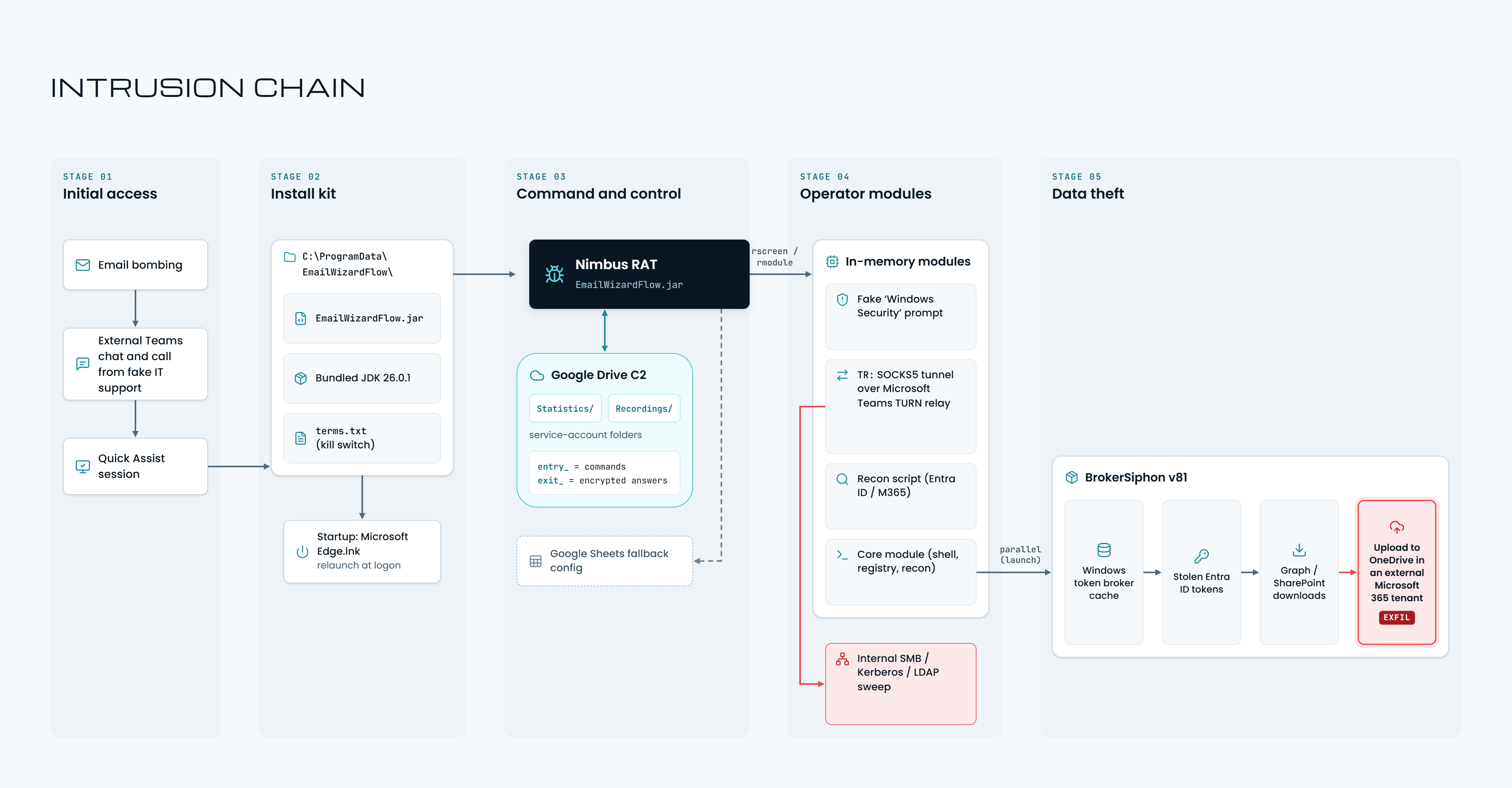
Figure 1: The attack chain from the Teams vishing call and Quick Assist session through the EmailWizardFlow RAT, the operator's in-memory modules, and the data theft tool that uploaded cloud files to an attacker-controlled Microsoft 365 tenant
What We Were Looking At
We found clear overlaps between EmailWizardFlow.jar and both of the Nimbus RAT builds that have been publicly reported. The 2025 build is a good place to start, because six of the nine command names published for it are still in this build, and recive even keeps its original misspelling. The configuration matches that build as well, since the keys that set the command and answer file prefixes start with cf_ and rf_, the same prefixes the 2025 build used for its command and answer files, and it still carries the same ssID field for a Google Sheets document.
The overlap with InboxCorePro.jar, the build documented in May 2026, is even wider, covering the install folder under C:\ProgramData named after a fake product, the bundled OpenJDK, a kill switch file, a lock file in %TEMP%, dependency downloads to %TEMP%\libs, Java source compiled into a memory class loader with a start() entry point, the entry_, exit_ and newconfig_ file names, a 15-character campaign identifier, the same three channels with the same poll intervals, and the same fake "Windows Security" prompt that steals focus through AttachThreadInput and SetForegroundWindow. One small overlap also clears up a detail from the 2025 build, whose published command logs show the credential prompt command run as loginform followed by a username and a 3, which the logs alone could not explain, and in this build 3 turns out to be the prompt command's default argument. All of that makes EmailWizardFlow.jar a new build of Nimbus RAT rather than a new family.
The operator's later commands can be read with the public key inside the RAT, as the cryptography section below explains. Because rscreen compiles Java source on the host, those commands carried the operator's code itself, including the source of the TR tunnel and the reconnaissance script, a short script that lists the drive roots, and the compiled classes of the Core module.
The Install Kit
The kit lives in C:\ProgramData\EmailWizardFlow\ and holds the two things that matter, EmailWizardFlow.jar and a jdk-26.0.1 folder. A shortcut named Microsoft Edge.lnk in the user's Startup folder relaunches the RAT at every logon through javaw.exe from the bundled JDK, and since the shortcut and every kit file were written within about two minutes of each other during the Quick Assist session, the extras came packaged with the kit rather than being added later.
The bundled JDK is a standard Oracle OpenJDK 26.0.1+8 build for Windows x64, in which all 126 executables and libraries in the copy we received carry valid signatures, the javaw.exe that launched the RAT is Oracle's signed build, and the security configuration is unmodified. The operator added two files to it: bin\terms.txt, a zero-byte file that acts as the RAT's kill switch, and bin\prunsrv.exe, a legitimate signed Apache Commons Daemon service wrapper that nothing in the JAR references. Neither file is malicious on its own, and the service wrapper in particular should not be treated as an indicator.
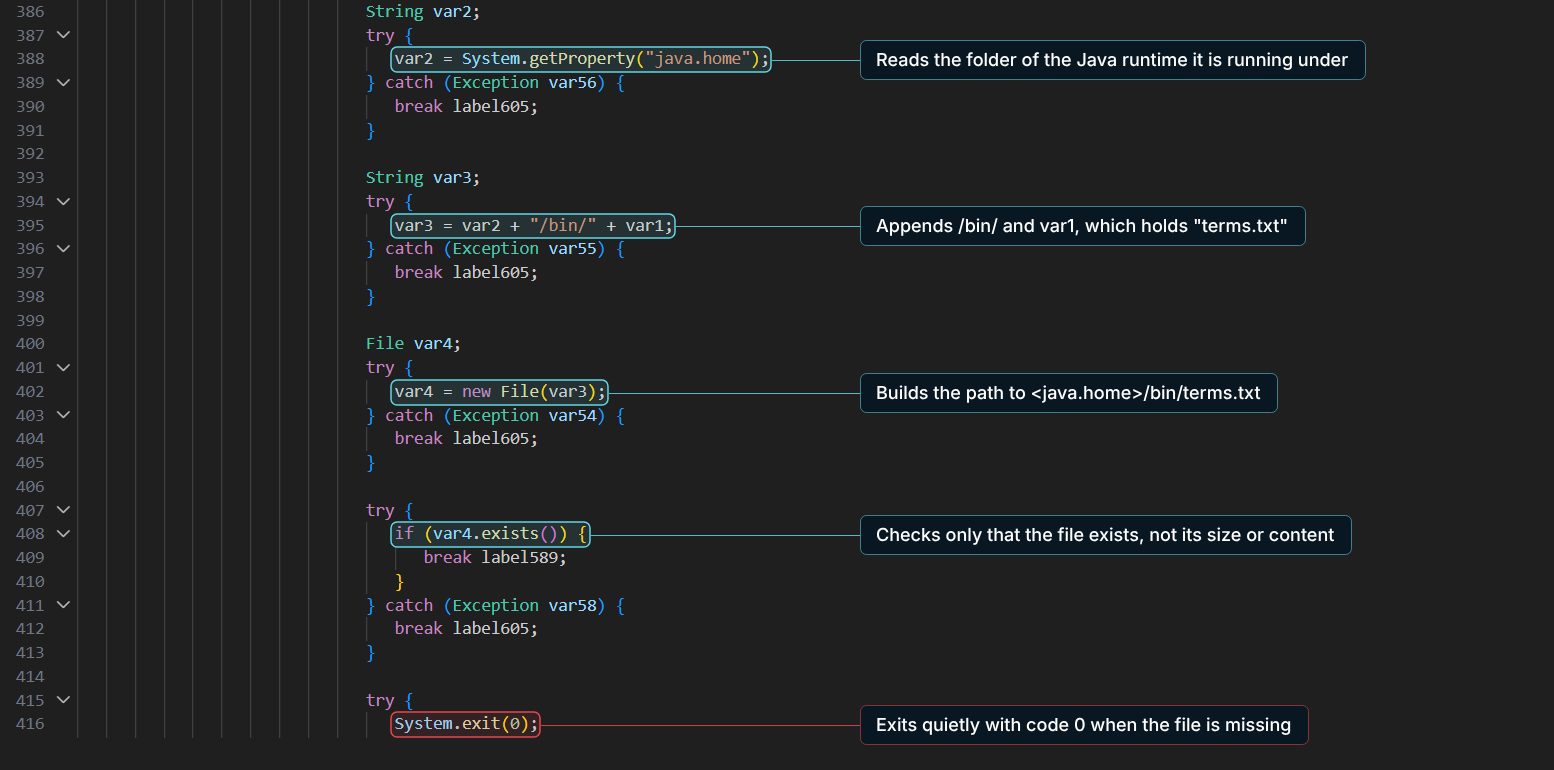
Figure 2: The kill switch check in `Pompeian.a(int)` after string inlining, where the RAT reads `java.home`, appends `/bin/terms.txt`, checks only that the file exists, and calls `System.exit(0)` when it is missing
Inside the New Nimbus RAT Build
EmailWizardFlow.jar is the newest Nimbus RAT build we have seen, and before deep diving into it, it helps to line it up against the earlier reporting, because most of the changes point in the same direction, toward less on disk and less for a sandbox or an analyst to observe:
The C2 design itself, with entry_ and exit_ files, newconfig_ updates, three channel types and the same poll intervals, carries over from InboxCorePro almost unchanged, which is a big part of why we are confident this is the same family.
Build and Protection
EmailWizardFlow.jar is a self-contained Maven JAR that bundles all of its libraries (Maven Archiver 3.5.0, Build-Jdk-Spec 26) with its pom stripped, and the JDK 26 marker only describes the build machine. Of the 34 classes outside the bundled libraries, 33 are Java 8 bytecode, but the obfuscator's key class, named a, is Java 17 bytecode and every other class calls it when it loads, which is why the RAT needs Java 17 or later. Class and package names are random dictionary words (the main class is HillinessunintendedMadhouse.Pompeian).
The build adds three protection layers on top of the name obfuscation, and together they are a clear step up from the light obfuscation reported for InboxCorePro.
The first layer is control-flow flattening, where most protected methods take an extra integer parameter and the body becomes a dispatcher that switches on values derived from that key, while methods with fixed signatures, such as main and callbacks, use a per-class key instead. That per-class key comes from a class-hash routine and goes into the key derivation, so the same block layout decodes differently in each class, and decompilers produce unreadable output for most methods.
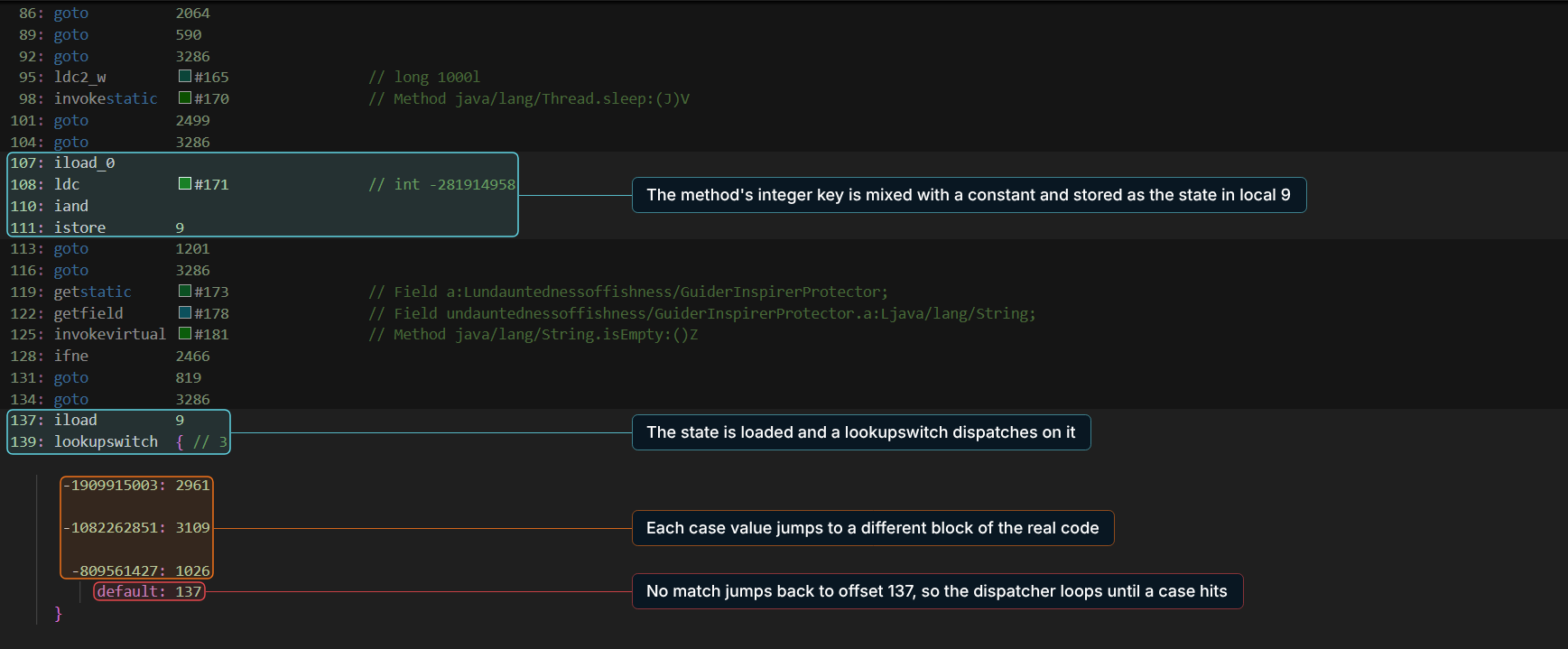
Figure 3: Part of `Pompeian.a(int)` in javap output, where the method's integer key (`iload_0`) is combined with a constant into the state variable in local 9, and a `lookupswitch` on that state picks the next block to run, looping back when no case matches
The second layer is string encryption, and all string sites go through a decryption helper for it. Each class's static initializer builds an XOR table and every call derives its key from a hash of the calling class and method, with integer constants going through similar table helpers.
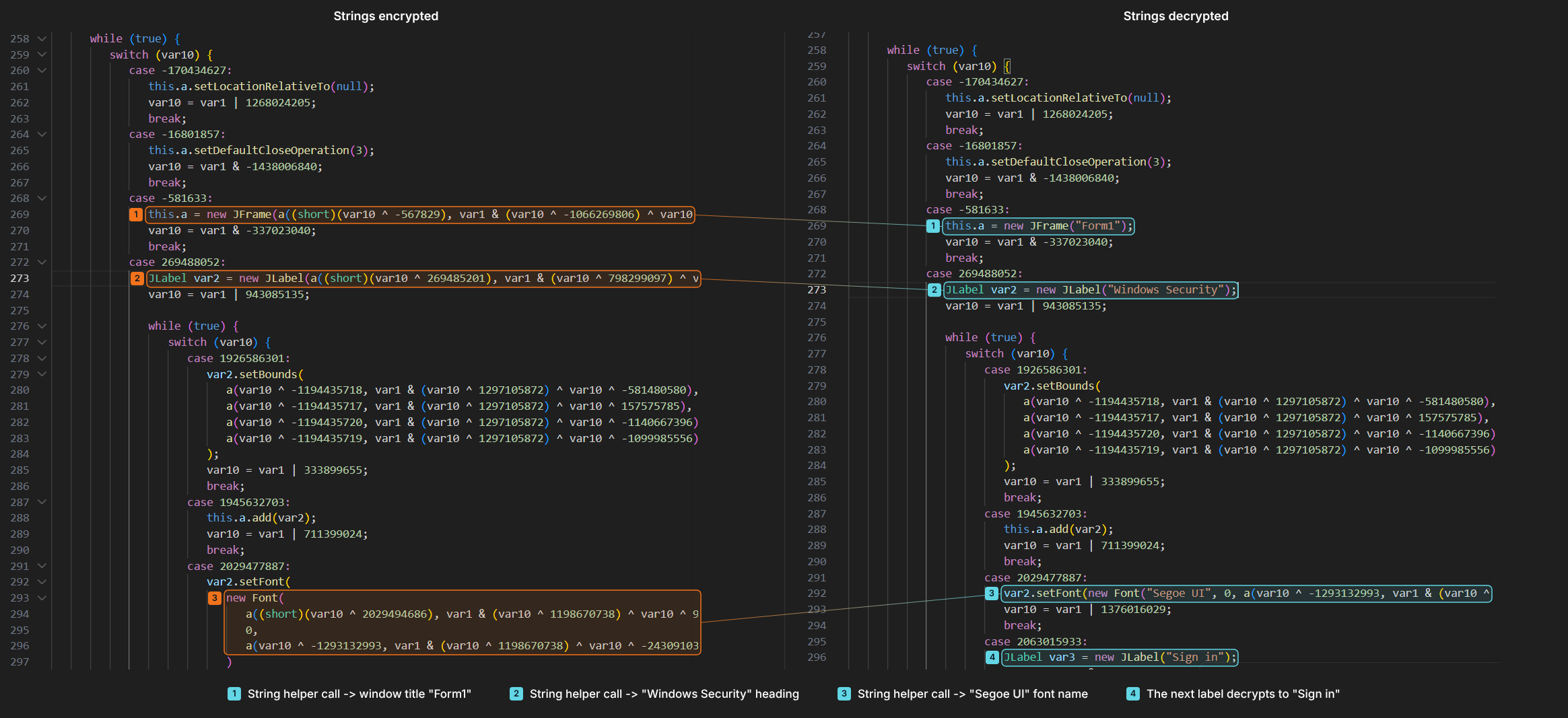
Figure 4: The fake credential prompt builder with its strings still encrypted on the left and decrypted on the right, where the calls to the string helper turn into the window title `Form1`, the "Windows Security" heading, the "Segoe UI" font and the "Sign in" label
The third layer is the one that gave us the most trouble, because the command dispatchers switch on cmd.toLowerCase().hashCode() and never compare strings, so the command words are not stored anywhere in the binary. The four dispatchers contain 33 distinct keys, and the two tables in the Commands section further down name 32 of them, with the last one (1322369778) known by its behavior only.
The Kill Switch and Other Startup Checks
The RAT's main method first takes a FileLock on %TEMP%\internal.lock to make sure only one copy runs (InboxCorePro used java_app.lock), exits if another copy already holds the lock, and registers a shutdown hook that deletes the file when the RAT ends, and the only command-line argument it accepts is start. It then checks for terms.txt in the bin folder of java.home, the runtime it is running under, and exits if the file is missing. In InboxCorePro the equivalent file was license.txt next to the JAR, and moving it into the bundled runtime is a smart change from the operator's point of view, because copying the JAR into a sandbox or running it with any other Java installation now gives you almost nothing to observe.
Next the RAT loads its configuration, and if a text file with a random-looking name hard-coded in the build exists in the JAR's folder, that file wins over the embedded one, while otherwise the RAT decrypts the configuration blob embedded in the JAR. Both the operator's newconfig command and the Sheets refresh save a new configuration under that name, but they write it relative to the javaw working directory, so it only ends up next to the JAR when javaw was started from that folder. There is no persistence code in the JAR at all, because the Microsoft Edge.lnk shortcut that the install placed in the user's Startup folder relaunches the RAT at every logon.
How Commands and Replies Are Encrypted
The JAR carries the operator's RSA-4096 public key in encrypted form, so the key never appears in plaintext anywhere in the file, and since any future build that answers to this operator should carry the same key, that key is the most stable way to tie new builds to this operator.
Both directions use the same layout, a 512-byte RSA block that carries a random AES-256 key, followed by a 12-byte IV and the data encrypted with AES-256-GCM, but each direction wraps that AES key with a different half of the RSA key pair, and that choice decides who can read what.
Inbound data, meaning the embedded configuration, configuration updates and every command, has its AES key wrapped with the operator's private key, so the public key inside every copy of the RAT is enough to unwrap it. That proves a command came from the operator without hiding it, so anyone with the sample can read the configuration and every command, which is what makes the operator's command history readable later in this research.
Outbound answers go the other way, with a fresh AES-256 key wrapped with the operator's public key, so only the operator's private key can open them, and the replies stay unreadable even where the commands can be read.
Exfiltrated files and screenshots skip this layer entirely and are uploaded as base64 of the raw bytes or as plain ZIP archives.
The Decrypted Configuration
Each Drive channel entry includes a complete service-account JSON key, private key included. The code that reads this configuration also supports an OAuth Drive channel (client ID, client secret, refresh token, user email) and a TLS socket channel (tcp_mirror_ip), but neither one is set up in this build's configuration.
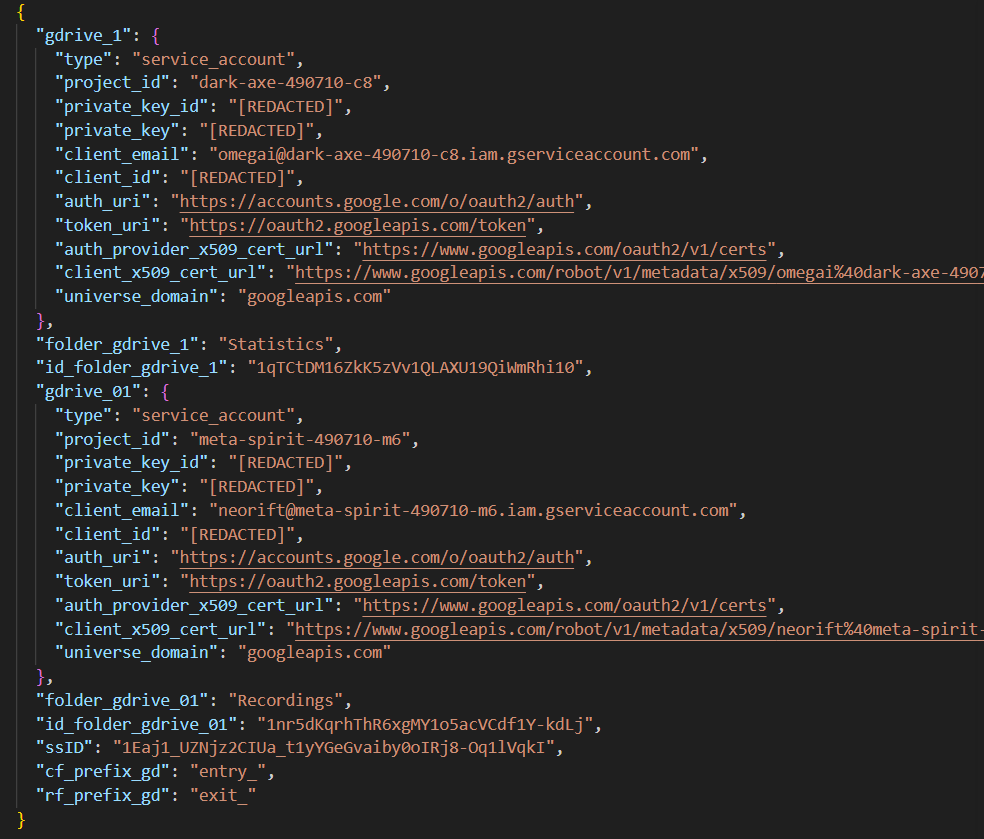
Figure 5: The decrypted configuration showing the two service-account Drive channels and their folders, the Sheets document, and the `entry_` and `exit_` prefixes, with the private keys, key IDs and client IDs redacted
Google Drive as a Command and Control Channel
The RAT groups its channels into numbered priority levels, taken from the number at the end of each configuration key, and runs one level at a time with one thread per channel, which in this build means both Drive channels are at level 1 and run together. A channel thread that dies is restarted at most three times while the RAT is running and then dropped, and when no channel in a level is still alive, the RAT moves on to the next level and cycles back to the first after the last one.
On a Drive channel the RAT looks in the operator's folder for a text file named entry_ plus its identifier, decrypts it, runs the command, and writes the encrypted answer to exit_ plus its identifier, creating or updating that file as needed. It clears entry_ after reading it, so a non-empty entry_ file is a command that has not been collected yet. Configuration updates are delivered the same way, in newconfig_ files, and a command file that fails to decrypt is overwritten with empty content and never gets an answer.
Poll intervals are random ranging 45 to 75 seconds for Drive service-account and TCP channels and 30 to 60 seconds for OAuth Drive. A channel starts in fast mode and enters it again on a wakeup command, polling every 4 to 8 seconds instead, and fast mode lasts about ten minutes from the most recent command, so an active operator session keeps it going. It ends immediately on sleep, which only affects the channel that received it, or when the folder holds no entry_ file for that host. Inside the channels, the short 3 second sleeps you will see are retry delays, and the 5 second sleeps separate attempts to find the Drive folder (up to ten) or to open the TCP connection. An exception ends the channel thread and the main loop restarts it within the limit above, and while the OAuth channel backs off on Retry-After and rate-limit errors, the service-account channels used in this build have no back-off of their own beyond those fixed 3 second retries.
Each Drive channel also creates or updates an empty text file named after the host identifier, once when the channel first starts and then at most every ten minutes on polls that find no pending command. Every update is a new Drive revision, so the file works as a heartbeat, although busy periods and thread restarts delay it and its revision count understates how long the RAT has been running. If that first write fails, the RAT drops the configured folder ID and uses any folder with the same name that the service account can see. The earlier reporting on this family does not mention the heartbeat file, even though it is the RAT's most regular write to Drive.
The Sheets channel is a two-hop recovery path that the RAT only uses after every Drive channel has failed, and even then only on every fifth recovery cycle, when the RAT fetches docs.google.com/spreadsheets/d/<ssID>/export?format=csv&id=<ssID>&gid=0, reads the first line of the CSV as a URL, downloads that URL, and treats the response as the encrypted configuration. Because the spreadsheet only holds a pointer, the operator can host replacement configurations anywhere and point infected hosts that have lost their Drive folders to a new configuration. These requests, like the dependency downloads described below, carry Java's default user agent.
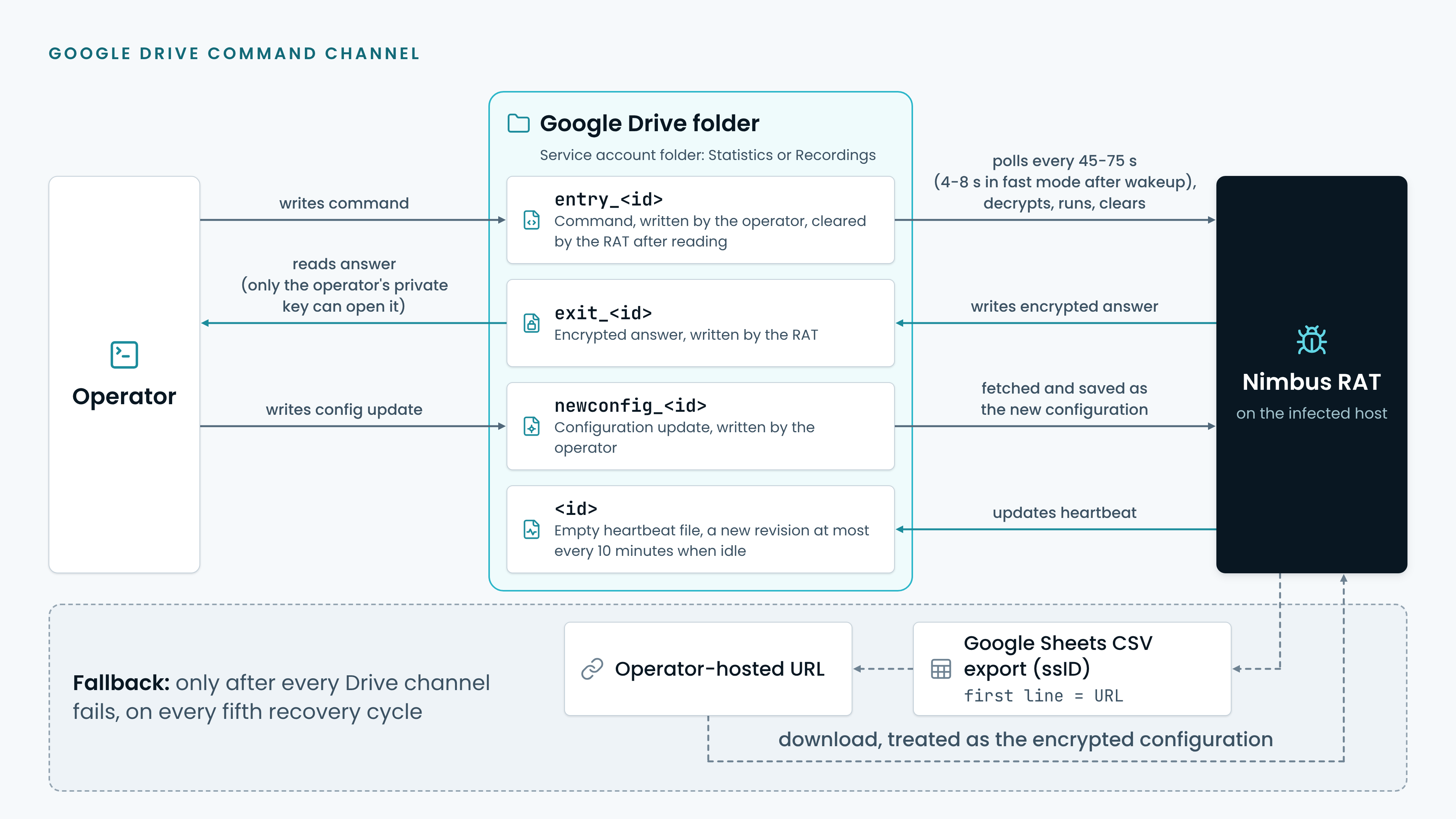
Figure 6: The Google Drive command protocol: operator-written `entry_` and `newconfig_` files, RAT-written `exit_` answers, the ten-minute heartbeat file, and configuration refresh from the Sheets CSV export
Commands
Some commands are handled by the channel itself and behave the same way on every channel:
Everything else goes to the command executor on a worker thread with a timeout of just under ten minutes, and a command that times out keeps running in the background after the RAT reports the timeout.
Despite their names, screen and rscreen have nothing to do with screen capture, because both take Java source code from the operator, compile it in memory inside the javaw process and run it, with screen running the code in the background and rscreen waiting for it to finish and sending its output back. Because the compiler runs inside javaw, no javac.exe process ever appears on the host, and when the code needs extra libraries, the source can list them on lines starting with /// , either as download URLs or as the JAR itself in Base64, which the RAT saves to %TEMP%\libs before compiling. By default the RAT runs a class named Test through its start method, and the reconnaissance script and the drive-root lister later in this research both use that default.
Any command word the RAT does not recognize is handed to a loaded module, written as module:command, and when no module is named it goes to the Core module, which is how the shell, registry and recon commands come back once the operator loads Core. Before running such a command the RAT shares its current settings with the module and reads them back afterwards, so a module can change how the RAT behaves, for example by setting oac, which sends every upload (recive, recivez, recivezf and screenshot) to an OAuth Drive account instead of the service-account folders, although the Core module we analyzed does not change that setting.
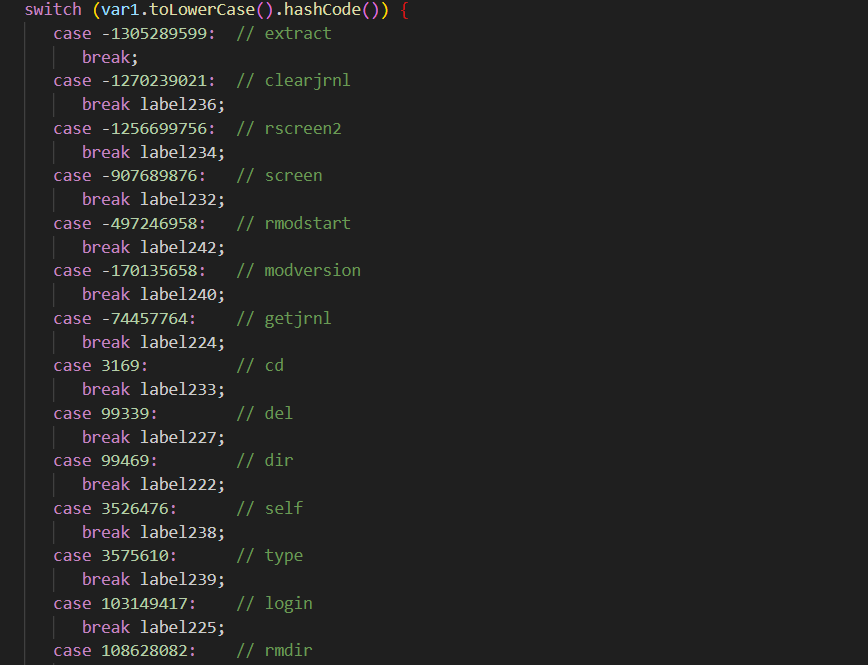
Figure 7: A snippet of the executor's `hashCode` switch, showing the first 14 of its 21 cases with the recovered command name next to each case value
Where Did the Shell Go?
The RAT itself has exactly one ProcessBuilder call site, and that is the fixed self-delete command. There is no shell command, no registry access and no host reconnaissance, all of which InboxCorePro carried built in (cmd, r and exec for the shell, reg for the registry, and ipconfig and systeminfo equivalents), and none of the loginform, startsocks5 or steal commands reported for the 2025 build either. Unless the operator loads code, the RAT cannot start an arbitrary process, and as the next sections show, the operator loaded that code within days.
The Fake Credential Prompt
The login command is a credential phishing prompt, a borderless, always-on-top window styled like a Windows Security dialog, with "Sign in" and "Enter your credentials" text, the user's name already filled in from USERDOMAIN\user.name, a password field and a "Remember my credentials" checkbox, and JNA calls to AttachThreadInput and SetForegroundWindow pull it in front of whatever the user is doing.
The prompt never checks the password because it does not need to, since whatever the user types goes straight back to the operator. After the first entry it claims the password is incorrect so the user types it a second time, which gives the operator two attempts and a better chance of catching a typo, and after the second entry it closes and returns both. If nobody answers within ten minutes it gives up and returns whatever was typed so far, and an optional argument sets a delay before the prompt appears, three seconds by default. The operator sent it shortly after failed network logons against domain controllers, which suggests the operator wanted the user's domain password at that point. Two details give it away, because the window's own title is Form1, the default name Visual Studio gives a new Windows Forms form, and closing it ends the whole process, so pressing Alt+F4 on the prompt takes the RAT down with it.
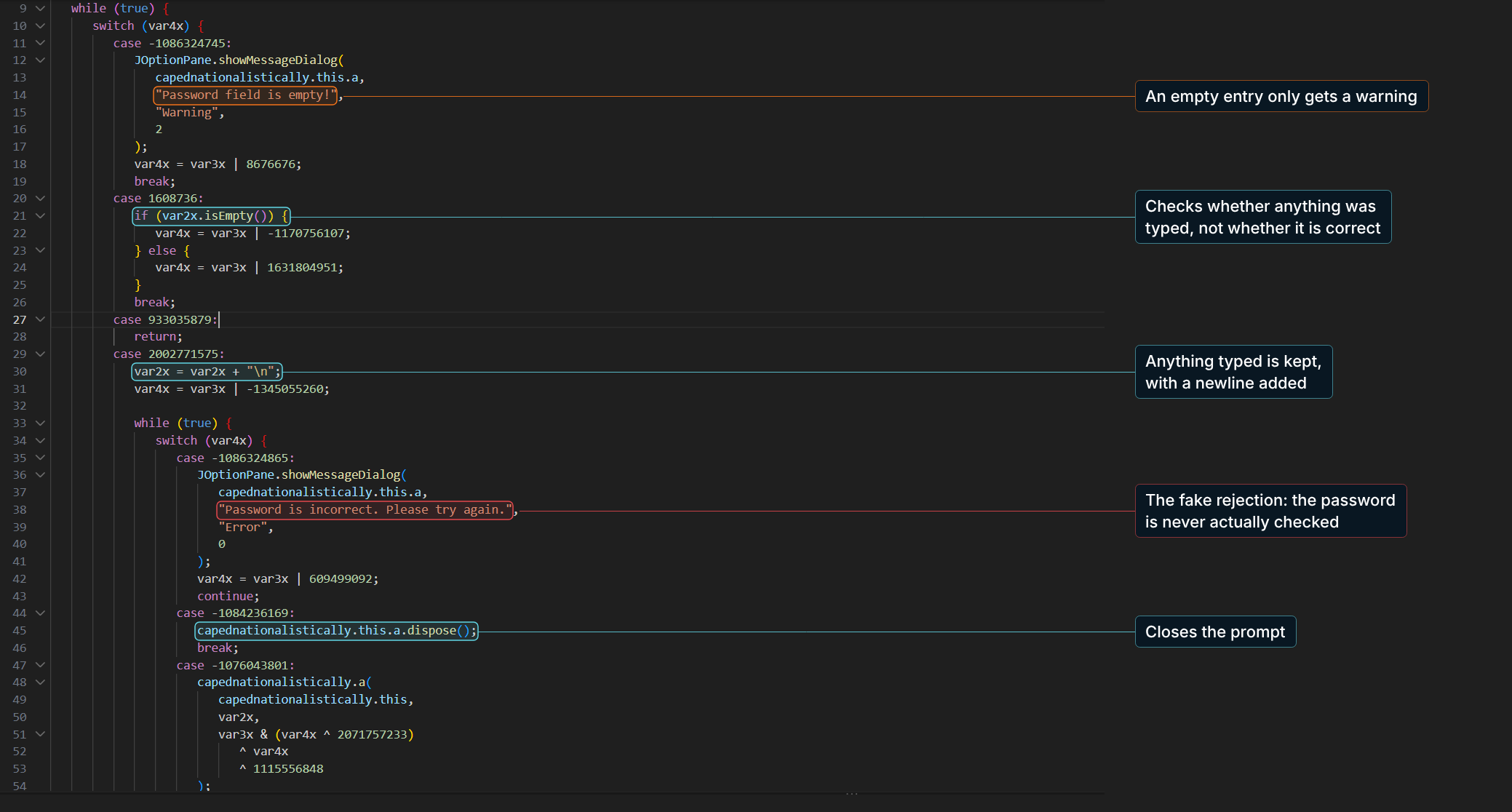
Figure 8: A decompiled code snippet from the fake prompt's OK button handler, showing an empty entry being rejected, whatever was typed being kept, and the fake "Password is incorrect. Please try again." message that makes the user type it again before the prompt closes
From Login Prompt to Data Theft
The table lists the operator's later commands in the order they were sent, with the size of each decrypted command. The answers to all of them are encrypted to the operator's key, so what the RAT sent back stays unreadable.
TR: A SOCKS5 Proxy over Microsoft Teams Relay Servers
EmailWizardFlow.jar bundles dev.kastle.webrtc:webrtc-java, a public Java binding for WebRTC data channels, together with its native DLL, and the build date of the DLL points to version 1.0.3, since the JAR itself does not record the version. The RAT itself never references it, and no class, method or decrypted string in the RAT mentions WebRTC, TURN or relays, which tells you the library is there for modules. The in-memory class loader that receives operator code uses the JAR's own class loader as its parent, so module code can resolve the WebRTC classes and the native loader can find the DLL at the JAR root. When a module touches the library, the DLL is copied to %TEMP%\webrtc-java-windows-x86_64<random digits>.dll and loaded from there, and although the copy is marked for deletion when Java exits, Windows cannot delete a DLL that is still loaded, so the copy is likely left behind either way.
The operator's TR module, sent with rscreen and compiled on the endpoint, is what the library was there for, a reverse SOCKS5 proxy whose only network path is a WebRTC data channel relayed through Microsoft Teams TURN infrastructure.
The module hardcodes the TURN server turns:worldaz-msit.relay.teams.microsoft[.]com:443 together with a TURN username and credential of the kind Microsoft issues to Teams clients for media relay, and it sets the ICE transport policy to RELAY so that no direct or reflexive path is ever attempted. Before doing anything else, it checks that the relay host resolves and that a UDP socket can be pointed at port 443.
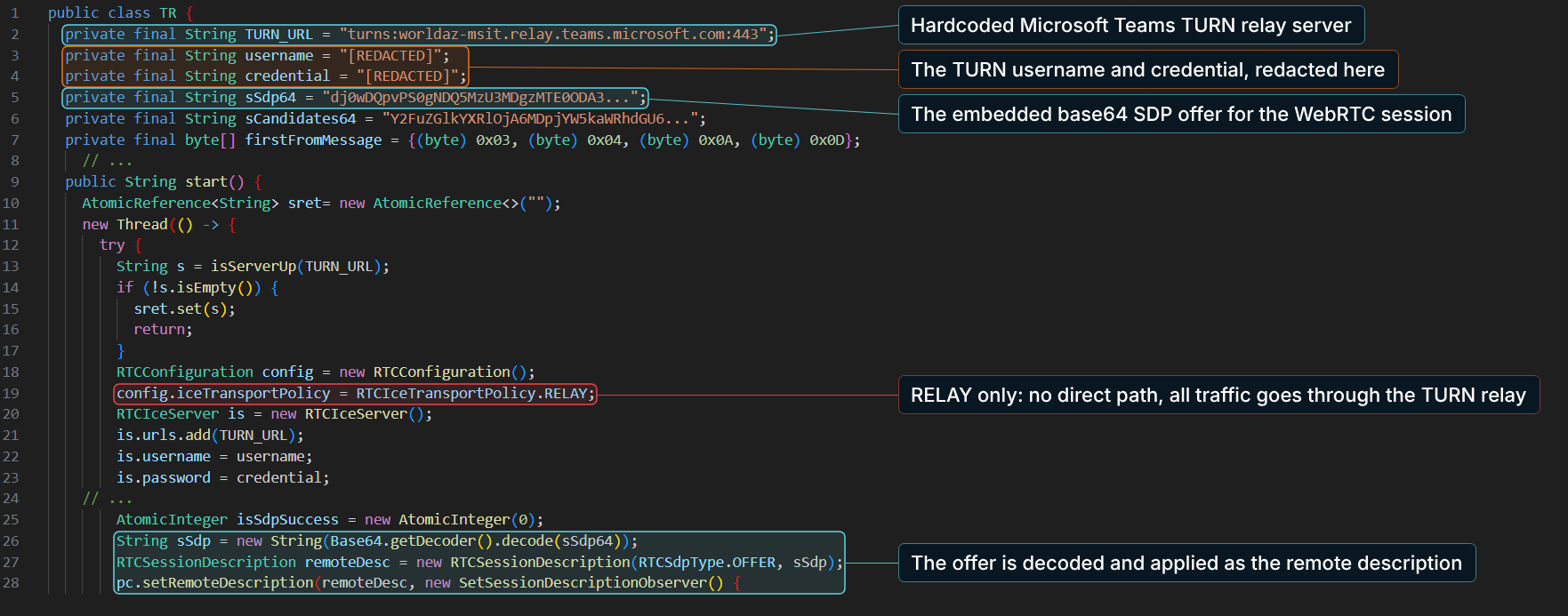
Figure 9: A snippet of the TR module's source, with the hardcoded Teams TURN server, the RELAY-only ICE policy and the embedded base64 SDP offer (TURN username and credential redacted)
The WebRTC signaling also travels over the RAT's existing channel, because the module embeds a base64 SDP offer created on the operator's side, applies it as the remote description, adds the operator's ICE candidates, creates an answer, and returns the answer SDP and its own relay candidates as the rscreen output. That output travels back to the operator encrypted in an exit_ file, the operator applies it, and the data channel opens through the relay without a signaling server being involved at any point.
The embedded offer also tells us more about the operator's side of the session, because its origin line carries a session version that is a Unix timestamp from just before the command was sent, so the operator generated the offer live for this session. Its two relay candidates point to a Microsoft relay address, 52.114.242[.]50 port 57197, and carry the related address 146.70.116[.]11 port 44478, a public address on M247 (AS9009), a hosting network that many VPN services use, from which the operator's client reached the relay.
Once the channel is open, the module waits for authentication by sending the four bytes TEST and requiring that the first four-byte message it receives is 03 04 0A 0D, and anything else stops the session. After that, the channel carries multiplexed frames made of a two-byte client ID, a two-byte length and the payload. The first frame for a new client ID is a stripped-down SOCKS5 CONNECT request (command byte 1, then an IPv4, domain or IPv6 address and a port, without the SOCKS version byte), and the module opens a TCP socket to the target from the endpoint and answers in SOCKS5 reply format, with separate reply codes for refused connections, unreachable networks, failed name lookups and timeouts. Later frames are relayed in both directions, a frame with a length of zero closes one client (or all of them when the client ID is also zero), and the module keeps trying to bring the channel up for 20 minutes before it gives up.
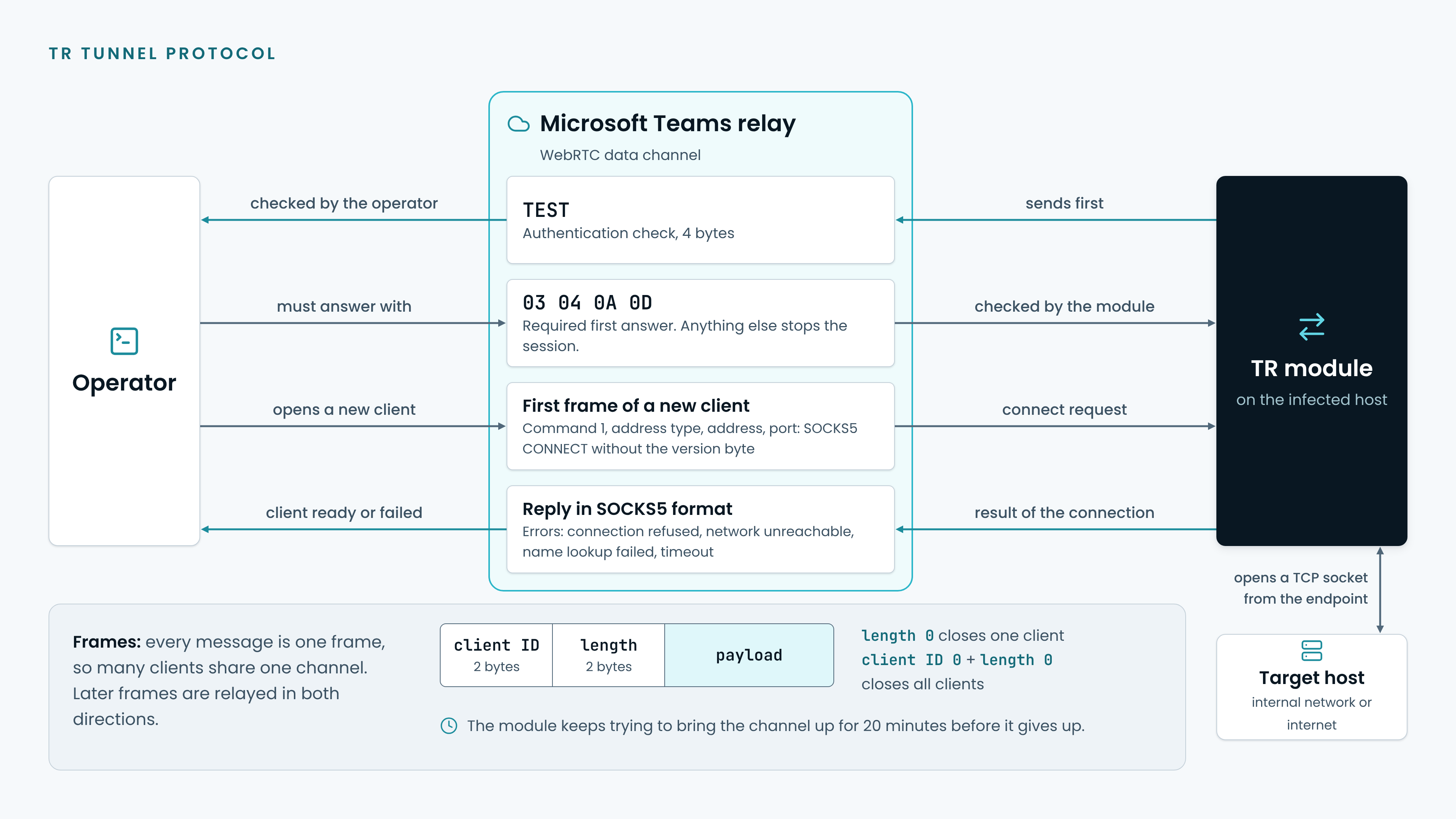
Figure 10: The TR tunnel protocol: an authentication handshake, multiplexed frames made of a client ID, a length and a payload, and a stripped-down SOCKS5 `CONNECT` request that the module answers in SOCKS5 reply format
In practice, the operator can reach any host the endpoint can reach, with the traffic leaving the endpoint as TURN over TLS on TCP port 443 to a Microsoft Teams relay. Teams media traffic is commonly routed around proxies and TLS inspection, so this traffic is often left completely uninspected. The 2025 build had a built-in startsocks5 command that started a Python-based SOCKS5 tunnel, and in this build that command is gone and SOCKS5 returns as a Java module whose traffic runs through Teams relays. Tunneling through Teams TURN relays is not new as a technique, but the earlier reporting on this family does not mention it, and TR carries its TURN credentials hardcoded instead of fetching them at run time.
Endpoint telemetry shows this exact pattern in several separate sessions, in each of which javaw.exe opened a listening socket and connected to a Microsoft Teams relay address on TCP port 443 within a tenth of a second, with the connection recorded against worldaz-msit.relay.teams.microsoft[.]com in most of them. In the last session the relay contact came shortly after the TR command was sent, and because the earlier sessions show the same pattern on the endpoint, those sessions most likely used TR as well.
During the one session, the javaw process connected to a range of Windows and Office service endpoints it never uses on its own (settings, notification, error reporting, Office configuration, Windows Update and consumer sign-in services), which is consistent with the operator's own Windows client routing its traffic through the proxy. In the same window, the javaw process scanned internal addresses, mostly to SMB port 445 along with RPC and the Kerberos and LDAP ports on the directory servers. Because the process that made these connections is the one holding the proxy, we assess that the operator most likely ran the scan through the tunnel. In the same window the endpoint generated failed network logons against domain controllers and other internal servers, and shortly afterwards the operator sent a fake credential prompt.
The Reconnaissance Script: Mapping Identity and Cloud Data
The operator sent a large Java source file, class Test, whose report opens with the header Azure / Entra / M365 enumeration, and later sent it again, unchanged. It reads mainly from the logged-on user's profile and environment, and the Public profile folders and the top level of each drive, starts no processes, makes no network connections, and returns a sectioned text report covering the following:
- Identity and join posture: the user, UPN hints scraped from files, and a guess at whether the machine is classic Active Directory, hybrid or workgroup from
USERDNSDOMAIN,LOGONSERVERand the computer name. - Mail and cloud storage: Outlook
.ostand.pststores, OneDrive roots, SharePoint and Teams libraries synced locally (raising anALERTbanner when one exists outside OneDrive), the Office file cache, and third-party sync clients such as Box, Google Drive and Dropbox (with its own banner). - Bulky stores: non-empty large data locations including OST and PST sizes and WSL packages, again with a banner.
- Tokens: the Windows token broker cache and the AAD broker plugin state, where the script lists
.tbresfiles and scrapes plaintext resource and audience hints and expiry metadata from their wrappers, while its own comments state that it does not decrypt the DPAPI-protected token bodies. - Azure and admin tooling: Azure CLI and Azure PowerShell profiles and AAD-related packaged apps.
- Working set: keyword matches in Downloads, Desktop and Documents, the largest files in Downloads, Office recent and unsaved files, jump lists, network shortcuts and UNC targets, recent
.lnktargets, VPN and remote access profiles, SharePoint URLs in browser bookmarks, history and cookies, Teams cache URLs, and Outlook attachment caches. - Secrets: files ending in
.kdbx, .key, .pem, .ppk, .rdg, .ovpn, .pfx or .p12, names containingpasswordorcredential, and the.ssh, .aws and rcloneconfiguration folders.
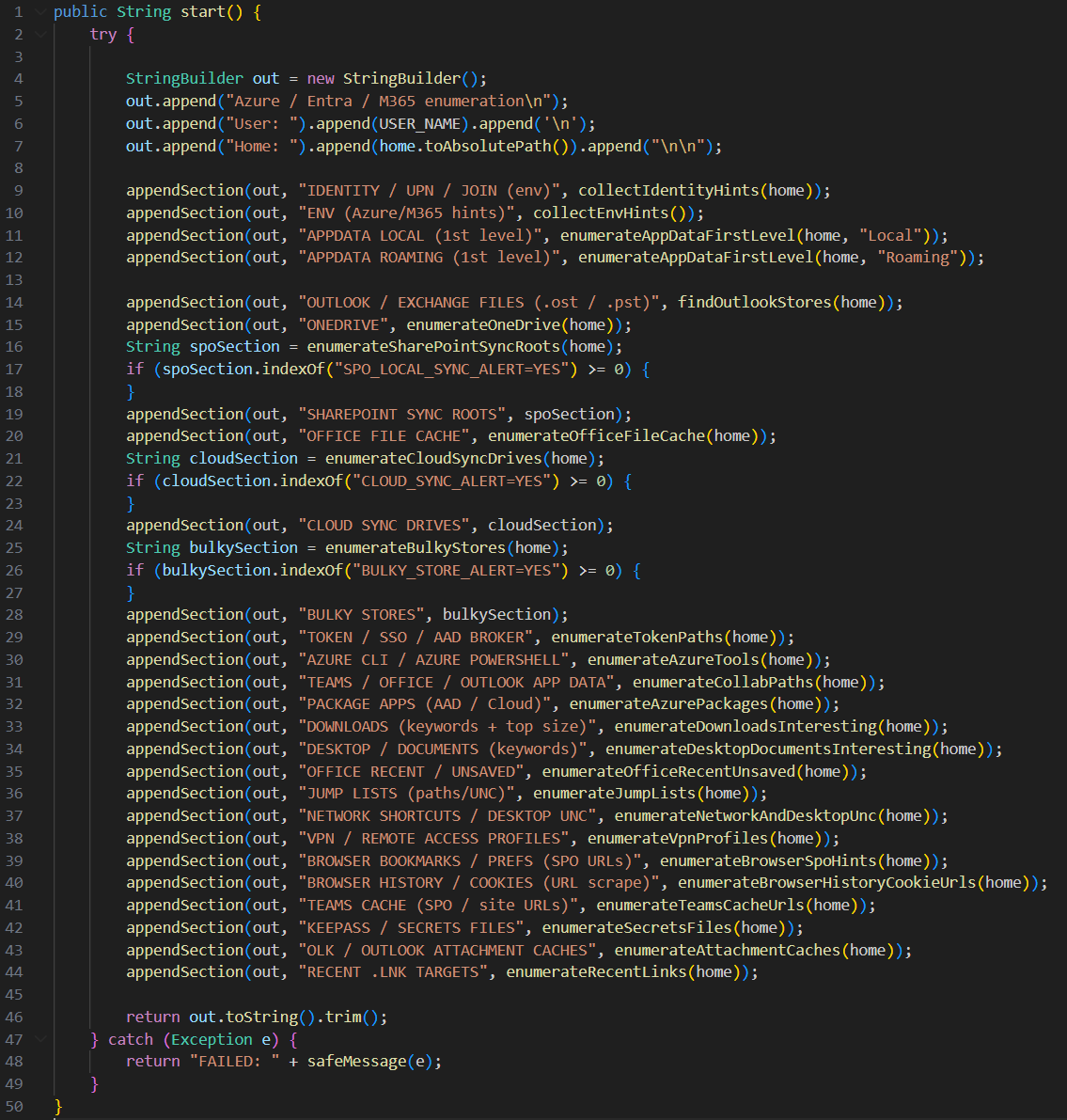
Figure 11: A snippet of the reconnaissance script's `start()` method, with an `appendSection` call for each of the 26 sections of the report it returns to the operator, and the text of its alert banners left out
This script is a planning tool, because it tells the operator where the user's valuable cloud data lives and which tokens exist before they commit a data theft tool to the host. A second, much smaller Test class lists the top-level contents of every drive root.
The Core Module: Putting the Missing Commands Back
The operator then loaded a module named Core, a ZIP of ten compiled classes (Core, three file visitor classes for listing, searching and zipping, and JNA bindings for the IP Helper API with their inner classes). Core is the class the executor hands unknown words to, together with the rest of the command line, and it picks the handler by the hash of the command word, the same way the RAT does. Each handler writes its output into a buffer that the RAT encrypts into the answer, and the decompiled code shows exactly what Core adds back:
- Command execution through
cmd.exe /c, a direct process launcher that waits 30 seconds (its own error message wrongly says10sec), and aparallelcommand that starts a program in the background without waiting for it, so the RAT stays responsive while the program runs. - Registry read, write and delete across
HKLM,HKCU,HKCR,HKUandHKCCthrough JNA'sAdvapi32Util, reading string, numeric, binary and multi-string values and writing string, expandable string and numeric values. - Process listing through
CreateToolhelp32Snapshot,Process32FirstandProcess32Next. - System and network information equivalent to
systeminfoandipconfig /all(GetAdaptersInfo,GetNetworkParams, DNS and WINS servers, DHCP state, MAC addresses), every environment variable, and the RAT's own start time labelled as the last reboot. - Regex file search, folder zipping, and a command named
tarthat actually zips a single file. - An
oauthcommand that stores an OAuth configuration string inside the module, which this build does not pass back to the RAT.
These line up with the shell, registry and recon commands that InboxCorePro carried built in, with parallel standing in for its fire-and-forget exec and a process lister added on top, and the operator loaded Core shortly before using its parallel command to start the data theft tool with the bundled javaw.exe.
The parallel command shows how this works in practice, because the operator sent parallel followed by the path of the bundled javaw.exe and -jar with the path of BrokerSiphon's JAR, and Core started it in a background thread with its output discarded and answered with only [+], so BrokerSiphon then ran on its own, which is why the operator had to read its run journal with a separate type command, since the launch itself returned nothing. A command like cmd works the other way around, because it runs the shell, waits for it to finish and returns everything it prints.
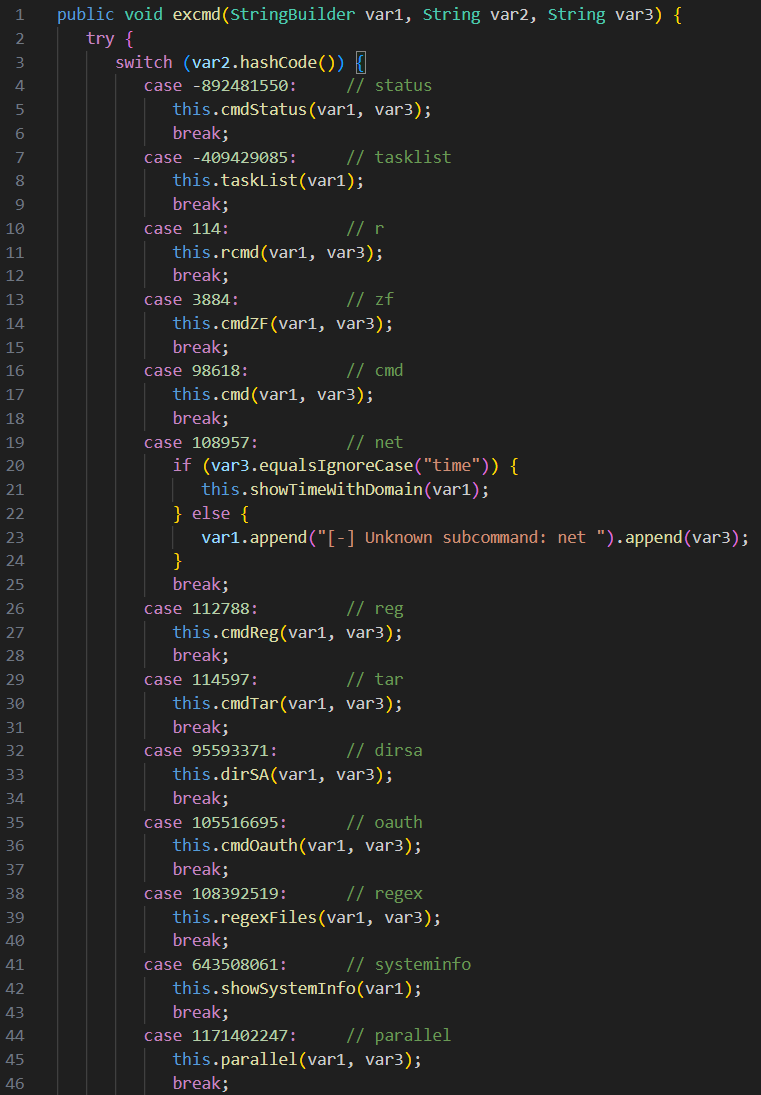
Figure 12: A snippet of the decompiled `excmd` method of the Core module, which switches on the hash of the command word, showing 13 of its 14 cases with the command name added next to each case
BrokerSiphon: The Data Theft Tool
The operator delivered v81.zip, a password-protected archive, opened it with the RAT's extract command, delivered its cfg.txt, and started v81.jar with the bundled runtime. The JAR contains no EmailWizardFlow strings and no copy of the RAT's public key, and it is built in a completely different way, as a self-contained Maven JAR (com.example:smb-crawler 1.0-SNAPSHOT, Build-Jdk-Spec 21) with its main class at com.jsmbxfer.runtime.SmbXferEngine. Its 256 class files carry no obfuscation at all, its messages and identifiers keep the developer's typos (mism@tch, a parameter named expectedSh256), and its build stamp is 20261027-112741584. We call the tool BrokerSiphon because it takes tokens from the Windows token broker cache and siphons files out of the cloud, and the developer's own names for it are SmbXferEngine, the main class, and JSmbCrawl, the name in its probe text.
The 256 classes are split across two packages, with the 189 classes in com.jsmbxfer.runtime making up the file theft engine, which names itself JSmbCrawl in its own probe text, and the 67 classes in org.example making up a token-driven SharePoint downloader that the configuration calls JToken.
BrokerSiphon reads its settings from a path on the command line, from the XFER_CFG environment variable, or from a cfg.txt file in the working directory or next to the JAR. The JAR also includes a commented sample configuration that covers the main options, although the code never loads it, and its values come from the developer's own test lab, with a lab.local domain and an administrator account.
One Tool, Eight Modes
The runKind setting in cfg.txt decides what BrokerSiphon does on each run, and v81.jar accepts eight values for it, with inventory used when the setting is missing:
Steals Microsoft 365 tokens, maps SharePoint and OneDrive, downloads and uploads everything it finds
spoprobewrite
Tests whether the stolen tokens can write into SharePoint libraries
The v83 and v85 builds accept a ninth value, writetestspo, which is a second SharePoint write test that writes a small text file (spo-write-test.txt by default) into each SharePoint folder on its target list, and into up to six levels of subfolders for entries marked as recursive. The file stays in every folder it was written to unless the probeDirKeepFile setting is turned off, in which case BrokerSiphon deletes it right after writing it.
Two cloud backends are built in, Microsoft Graph as the default and the Google Drive v3 API as the alternative.
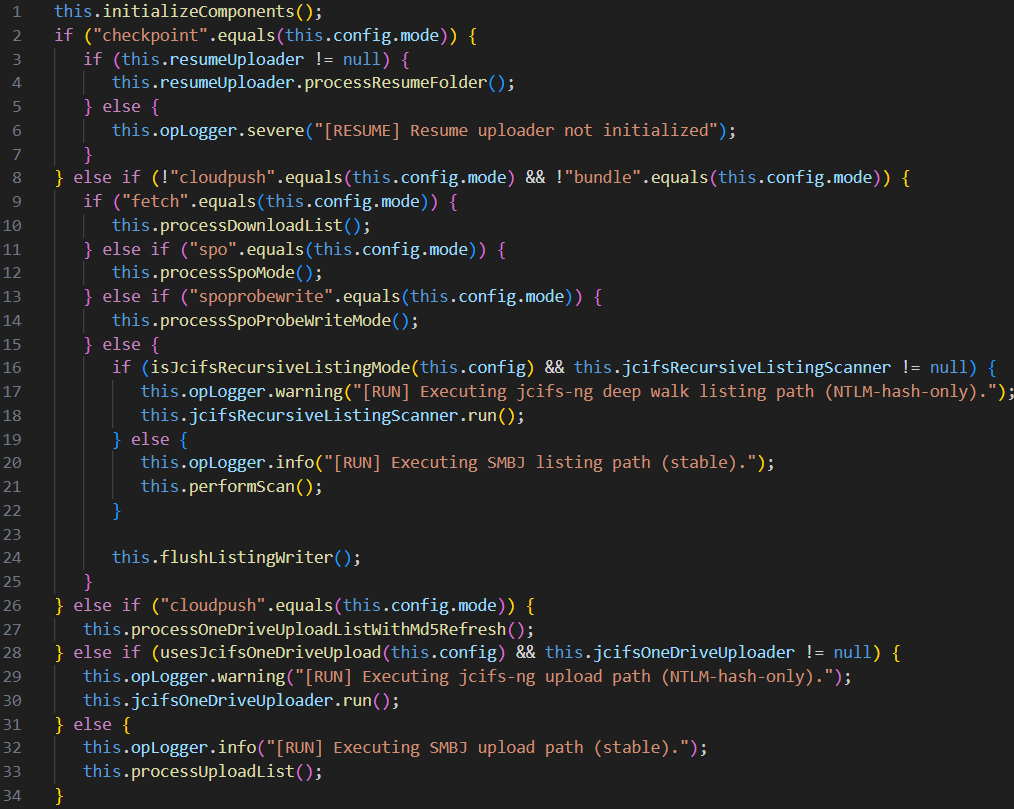
Figure 13: A snippet of `SmbXferEngine.run()`, where a chain of comparisons on the `runKind` setting routes the run to the resume, download, SharePoint, SharePoint write test, listing or upload code
Stealing Tokens from the Windows Token Broker
In SharePoint mode BrokerSiphon starts by reading the Windows token broker cache in the user's profile (the path can be overridden with tokenBrokerDir), walking that folder recursively and reading every .tbres and .tkn file. Each .tbres file is a JSON record (TBDataStoreObject, then ObjectData and SystemDefinedProperties), and inside it a ResponseBytes field holds the token response, flagged IsProtected. BrokerSiphon decrypts ResponseBytes with the Windows data protection API as the logged-on user, with the no-prompt flag set, and then reads the token fields WTRes_Token, WTRes_RefreshToken, WTRes_Account, WA_UserName and WA_Provider, with the parser also accepting a misspelled WA_Provier key.
For each token it decodes the JWT claims (audience, expiry, authentication methods, tenant) and names the issuing application from a built-in table of 152 first-party Microsoft application IDs, then writes every entry to tokens.txt as a block of key and value lines, with a line of dashes between one record and the next. A freshness check keeps only unexpired access tokens, and the run stops if none of them is for Microsoft Graph or SharePoint.
This is the part of BrokerSiphon defenders should care about most, because the token broker cache holds the tokens that Teams, Office, Outlook and the OneDrive sync engine obtained through single sign-on, so it never needs the user's password and never triggers an MFA prompt.
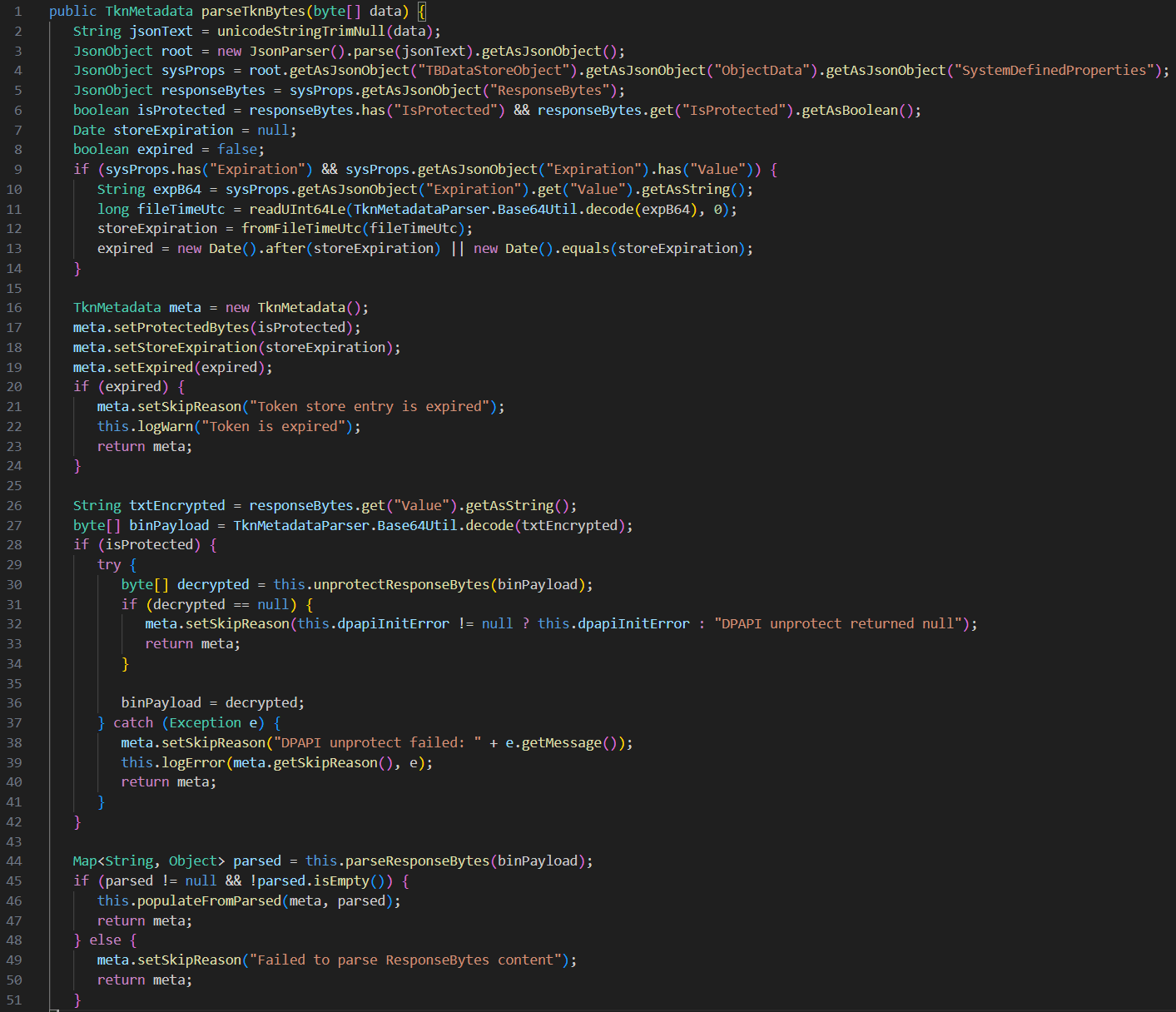
Figure 14: A snippet of the `.tbres` parser, which reads the `TBDataStoreObject` JSON, takes the `ResponseBytes` value, unprotects it with DPAPI when `IsProtected` is set, and parses the token fields out of the result
Refreshing Tokens and Continuous Access Evaluation
When a token needs renewing, BrokerSiphon posts a refresh_token grant to login.microsoftonline.com for the token's tenant, using the token's own application ID as the client ID and the scope <resource>/.default offline_access openid profile, where the resource is Microsoft Graph or the tenant's SharePoint host, so the refreshed token keeps the same first-party app identity.
When Graph or SharePoint answers with a Continuous Access Evaluation claims challenge (insufficient_claims in the WWW-Authenticate header), which Microsoft sends when it wants a token re-checked, BrokerSiphon decodes the challenge and repeats the refresh with it attached. The developer's own warning message says redemption fails if the public IP address differs from the one Office used when it got the token, and BrokerSiphon avoids that problem by running on the victim's machine, so its requests leave from the same IP address as the user's own.
Every Graph and SharePoint request against the victim tenant carries an Edge 122 browser user agent and a fresh client-request-id, with a random delay of 40 to 200 milliseconds, although token refreshes and uploads do not. In the tenant's audit log every download appears under the Microsoft Teams desktop and mobile client application ID (1fec8e78-bce4-4aaf-ab1b-5451cc387264), because that is the app the stolen token was issued to.
[Image 15]
Figure 15: A snippet of the token refresh routine, which reuses the token's own client ID, adds the CAE claims challenge to the request, and logs the developer's note that redemption fails if the public egress IP has changed
Mapping the Tenant
Discovery of the tenant combines Microsoft Graph and SharePoint REST calls in three steps:
- Graph, grouped through
$batch: the root site, the user's drive, followed sites and a site search - SharePoint REST search for
contentclass:STS_Site - Document libraries and their folders through
/_api/web, with subsites through/_api/web/websas an optional step.
A separate command-line mode in the same JAR adds joined teams, Graph search queries, a document library search (contentclass:STS_List_DocumentLibrary) and a list of site users with each user's IsSiteAdmin flag through /_api/web/siteusers.
If the operator supplies no list, BrokerSiphon writes everything it found (the root site, followed and searched sites, and the user's OneDrive) to downloadlist.txt, and the same run then downloads all of it. From the second run on, BrokerSiphon also asks Microsoft Graph for a delta link for each drive, which is a link that marks the state of the drive at that moment. Once a drive has been downloaded without errors, BrokerSiphon saves its delta link to spo-download-state.txt.graph-delta next to the JAR, and the next run sends that link back to Graph and gets only the files added or changed since then.
Choosing What to Take
BrokerSiphon does not take everything, and it is tuned to keep recent business documents and drop bulk:
- About 70 folder names are skipped: system and profile folders (
AppData,ProgramData,Windows,temp,logs,cache) and build, package and source-control folders (node_modules,.git,bin,obj,build,dist,vendorand similar). - Shortcuts,
desktop.ini,thumbs.db, OneNote tables of contents, Google Docs stubs, partial downloads and Office lock files are skipped. - Installers, executables, libraries, audio and video files, JPEG and raw or design image files, and source and build files are skipped by extension.
- Folders with
archivein their names are skipped. - Files whose names or paths contain a date older than the minimum year, which defaults to 2020 and can be changed in the configuration, are skipped, using five date patterns, and files without a date in their name or path are judged by their modification time.
- Hard caps limit a run to 5,000,000 files, 900 GB and 10 GB of staging on disk, with at least 20 GB of disk kept free, and recursive uploads also skip any file over 3 GB.
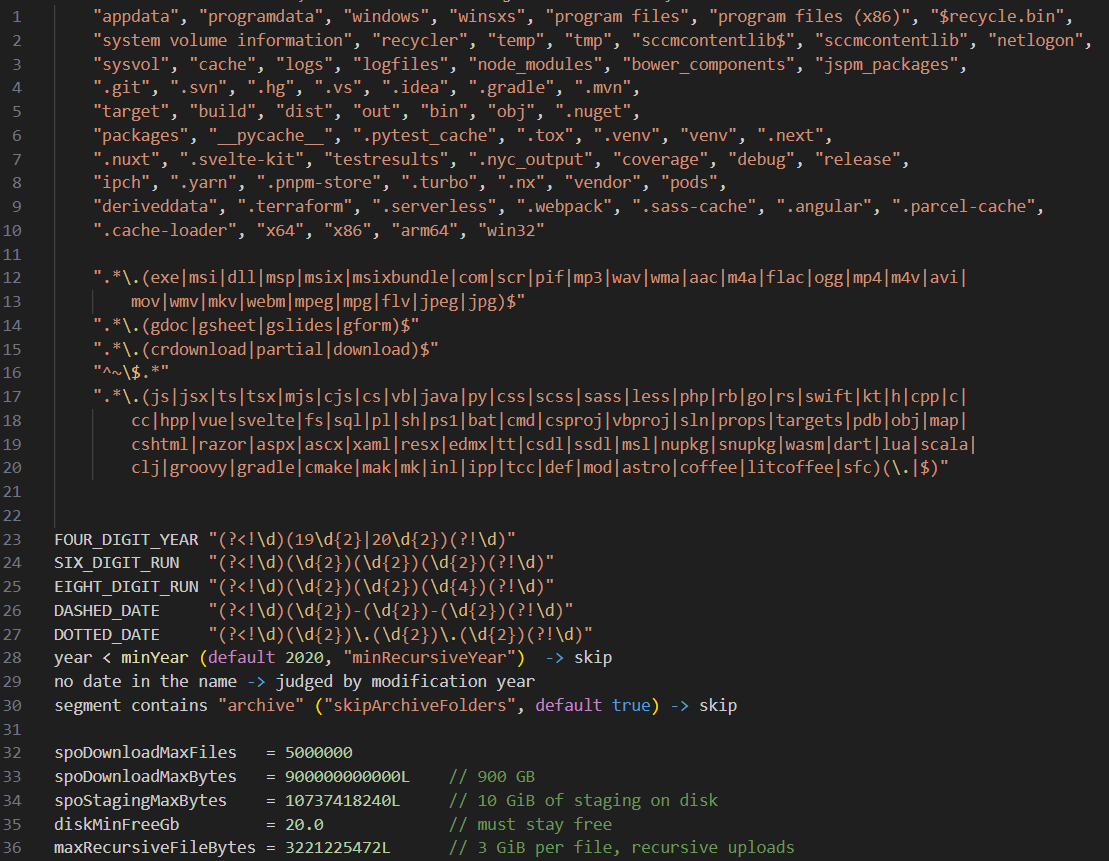
Figure 16: The selection rules in v81, condensed from four classes: skipped folder names, skipped extensions, date patterns and the run caps
Staging and Upload
By default, eight download workers pull files into SPO\ under the install folder. Files under 4 MB are packed into ZIP archives of up to 50 MB, named archive_NNN_<session>.zip, under temp_<13 digits>_<8 hex>\, where the digits are the launch time in Unix milliseconds, and files of 4 MB or more go to SPO.deferred-large\ and upload individually through Graph upload sessions. Inside an archive, entries with the extensions ps1, cmd, bat, vbs, xml, sh and py are XOR-encoded with a hardcoded key and renamed with a .xor suffix while all other entries are stored as they are, which is trivial to reverse and most likely exists to keep script files from tripping content scanning of the archive. An archive that fails to upload stays in its temp_ folder with a small manifest, and the next start of BrokerSiphon uploads it again.
Uploads go to a OneDrive account in a Microsoft 365 tenant the attacker controls, and BrokerSiphon authenticates with a Graph application ID, tenant ID, client secret and refresh token hardcoded in its configuration class, none of which we reproduce. The developer put real effort into handling Microsoft's rate limits, and the upload client backs off in several ways when it gets throttled:
- The upload client waits as long as the
Retry-Afterheader says, clamped to between 1 second and 5 minutes, and waits 60 seconds when there is no header. - Large uploads run at most two at a time and drop to one after two throttling responses within a minute.
- Uploads pause for five minutes after ten failed uploads in a row.
- Partial uploads resume, and paths too long for OneDrive are moved under a
_path_too_longfolder.
The default throttle is 50 Mbps with an adaptive lower bound, and the upload client renews its own access token every 50 minutes.
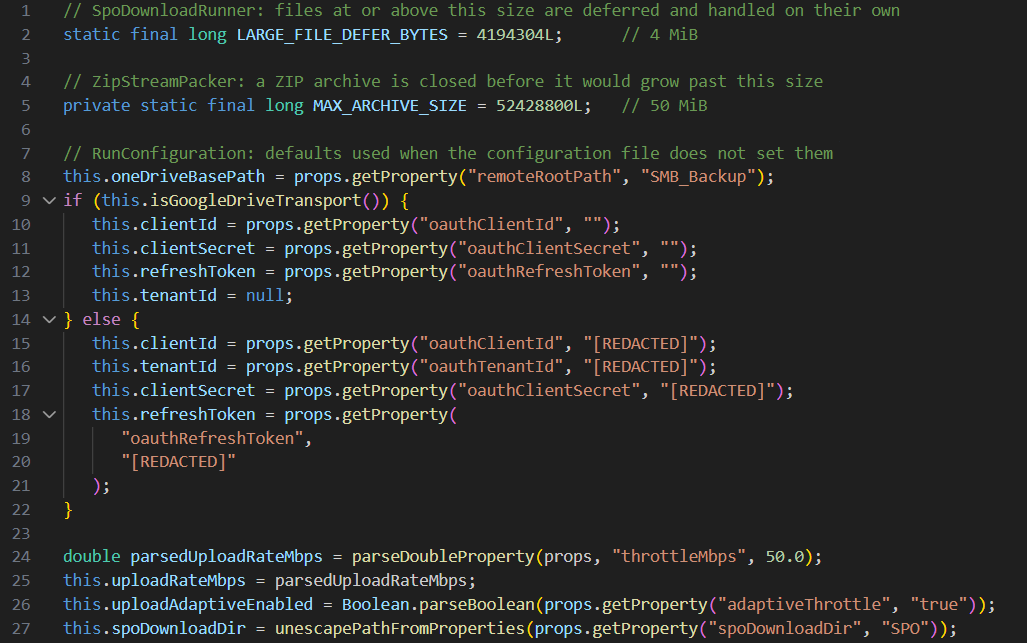
Figure 17: The run configuration defaults and staging constants (4 MB large-file threshold, 50 MB archive limit), with the hardcoded Graph application, tenant and credentials removed
Telling the Operator What Happened
BrokerSiphon keeps a detailed record of its own run, and these are the files to look for on an infected host:
journal_<run id>.log: the full log.peer_journal_<run id>.log: a second copy of the log, always written in the JAR folder. The operator can read this file back through the RAT'stypecommand.inventory_<run id>.txt: the listing.xfer_done.txtandxfer_fail.txt: a ledger of every file sent or failed.gap_events_<run id>.ndjsonandgap_summary_<run id>.json: paths that disappeared or could not be read.spo-<timestamp>.log,spo-download-state.txtandspo-listingfiles: SharePoint detail and progress.boot_trace.lognext to the JAR: a startup trace, with start and shutdown lines also written to the working folder and%TEMP%\boot_trace.log..run.lockinside thetemp_<run id>staging folder: marks the folder as in use so cleanup and recovery by other runs skip it.
There are two stop controls, with a STOP.txt or stop.txt file next to the JAR, checked every two seconds, making BrokerSiphon skip any files it has not started and end the run, and a TOKENSTOP.txt file stopping SharePoint listing and download at once.
A Ransomware Encryptor and Other Modes It Did Not Use
The SMB theft mode takes targets as single hosts or CIDR ranges, expands them, and checks each one for an open port 445, with a 1.5 second connect in the listing preflight and a 3 second one before it lists the folders each host shares over the network and walks through them recursively. It asks each host for its list of shares and skips IPC$, print$, NETLOGON and SYSVOL, and when a host does not return a list, it tries ten common share names instead, the administrative shares C$, D$, E$ and ADMIN$ and the folder shares Users, Share, Public, Data, Backup and Documents. Authentication uses a password through smbj, or only an NT hash through jcifs-ng, which its own logs call hash-relay and which is plain pass-the-hash, since a stolen hash is enough to read file shares. In hash mode BrokerSiphon packs files under 4 MB into archives, streams larger ones, and skips any file of 100 MB or more.
The SharePoint write test (spoprobewrite) writes spo-write-test-<timestamp>.txt, containing JSmbCrawl SharePoint write probe and a creation time, into SharePoint folders to see where the stolen tokens can write, and it leaves the files behind. The timestamp is the UTC date and time to the second, taken once per run, so every folder in one run receives the same file name. A list entry that ends with a slash and two asterisks (the recursive marker) is walked folder by folder, the mode skips OneDrive personal paths, Forms folders, folders whose names start with an underscore and folders with archive in the name, and it moves on to the next stolen token when one is refused.
The local-file probewrite mode is a file encryptor, even though it is named as a write test. It reads the first few bytes of each file, as many as the probeWriteBytes setting asks for (one by default and at most 4,096), encrypts them with a fresh AES-256-GCM key (12-byte IV, 128-bit tag), wraps that key with RSA-OAEP (SHA-256) using a pubkey.txt file in the working directory or next to the JAR, which must match the SHA-256 fingerprint set in the configuration, and then writes the encrypted bytes over the start of the file. Even the default of one byte corrupts the start of the file, and a larger count damages more. When the rename option is on, BrokerSiphon also renames each file to .enc and never renames it back, even though its own log line describes a round trip, and only the operator's private key can decrypt the overwritten bytes. This mode was not configured in the run we analyzed and no pubkey.txt was present, but the operator does have one, and the section on the ransomware inside BrokerSiphon below shows the operator staging it with the June build of the same encryptor, a matching configuration and a ransom note.
An option that is off by default installs a trust-all certificate manager and hostname verifier for every HTTPS connection in the process, which suits networks with intercepting proxies, and an unused SecretEncoderCli class XORs strings with the key MySecretKey2024!.
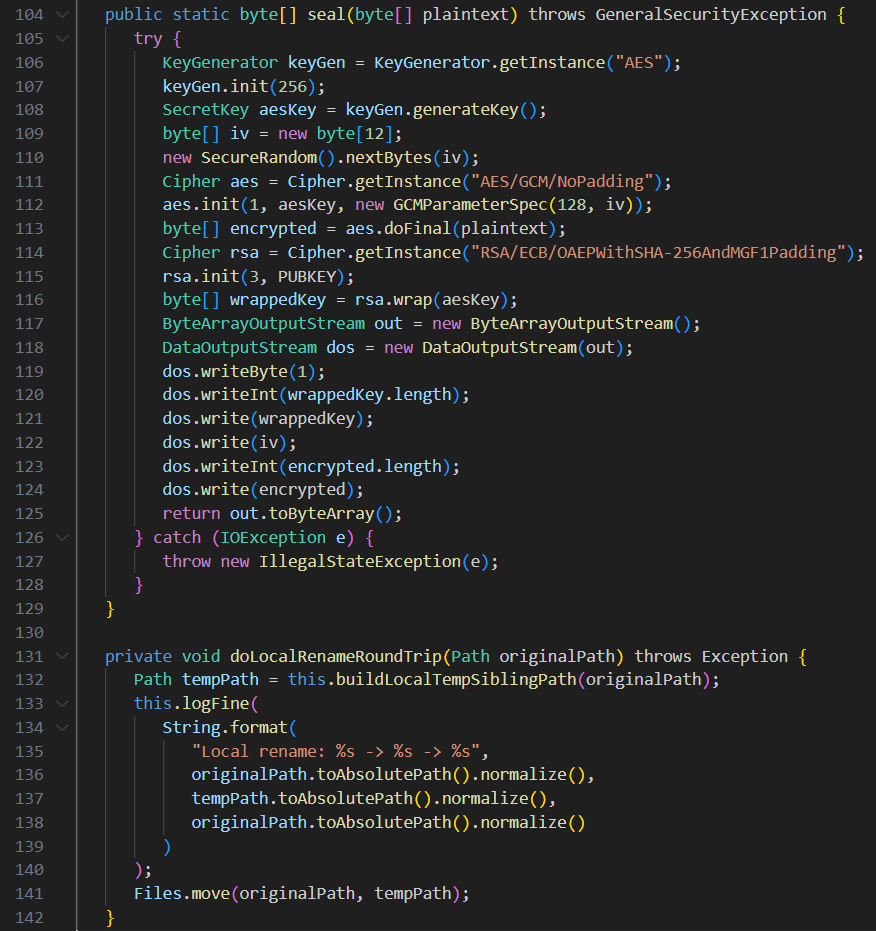
Figure 18: `CryptoEnvelope.seal`, which encrypts the first bytes of a file with AES-256-GCM and wraps the key with RSA-OAEP, and the `.enc` rename that is never undone
Build History
We now have about eleven BrokerSiphon builds from June to November 2026, along with two standalone token downloaders that were merged into it, and lined up by build date they show it growing from a plain SMB crawler into the token-stealing cloud siphon described above, with new builds appearing every few days through late October and early November.
Build
Uploads files left by an earlier run first, picks up entries added to downloadlist.txt during a run, and lets an in-progress large upload finish on STOP.txt
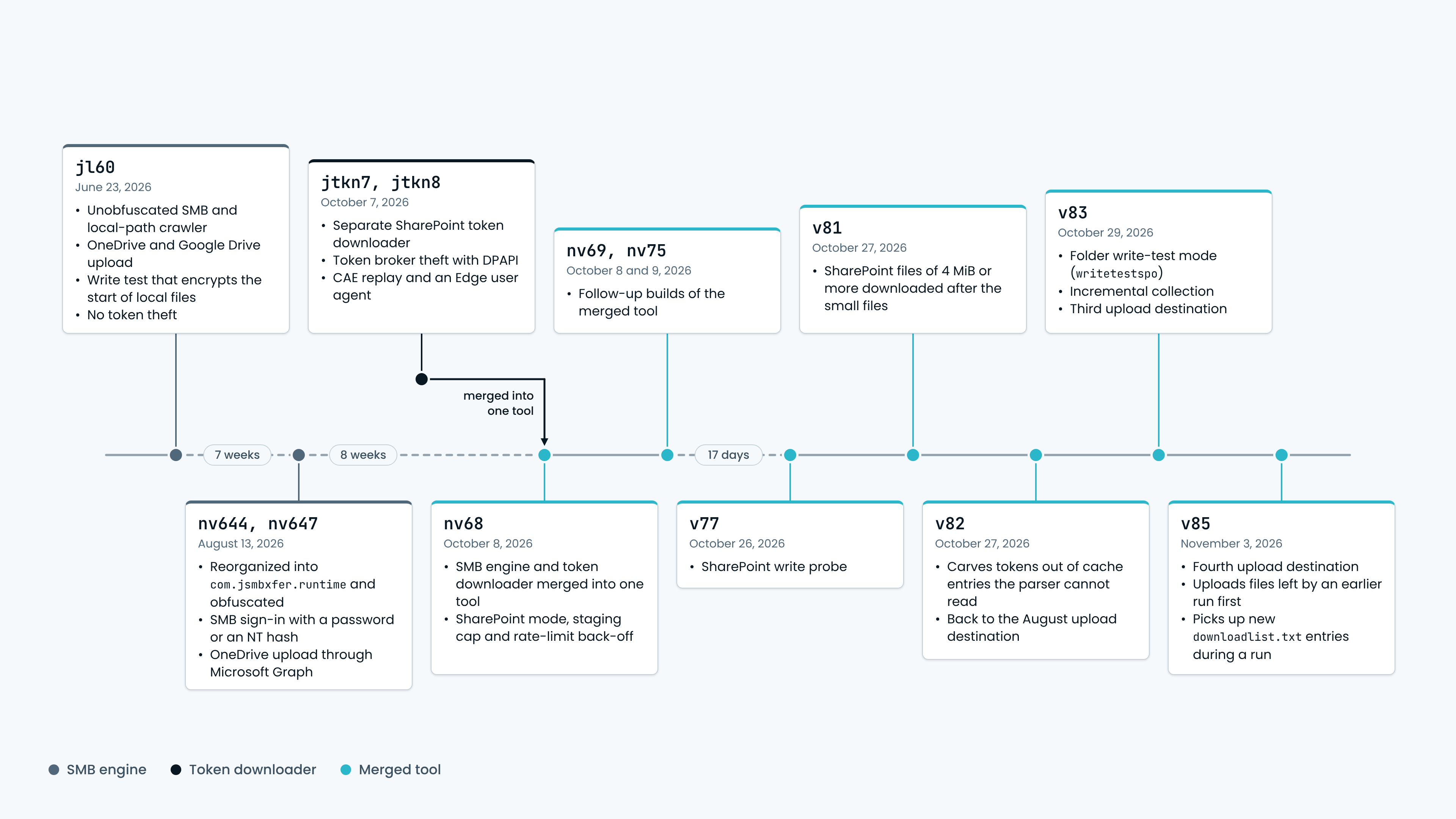
Figure 19: BrokerSiphon build timeline from jl60 in June to v85 in November 2026, with the main feature each build added
jl60 is the oldest build we hold, and its build ID dates it to June 23, 2026 at 15:21 UTC, about seven weeks before the August builds. It is not obfuscated, its main class is org.example.V2_JavaSmbCrawler, and it already uses the same Maven artifact name as every later build, com.example:smb-crawler, along with several selection rules that v81 still applies (the 3 GB file cap, skipping folders with archive in the name, date-token filtering with a minimum year). It shares no class names with the August builds, but its write-test handler has the same methods as the later ProbeWriteRunner, so the August code is a renamed and reorganized descendant rather than a rewrite. There is no token broker code anywhere in jl60, which fits token theft first showing up in the October builds.
The developer also left the logs of their own test runs inside jl60 by mistake, which is something we are always happy to find. BrokerSiphon writes a copy of its run log next to the JAR it runs from, and during the developer's unit tests that folder was Maven's target/classes, which is the folder Maven packs into the JAR. The build picked up 46 run_jarside_*.log files, a jsmbcrawl_startup.log and the lock files Java's logger leaves next to an open log, and nothing in jl60 ever reads them back. The 46 runs all started within two minutes, their local times run three hours ahead of the UTC build ID, and the startup log stamps the same runs with an explicit +0300 offset, which is UTC+3. The paths in those logs show the project lives on a VeraCrypt-encrypted volume on a Linux machine (/media/veracrypt2/TOOLS/JSmbCrawl), so a developer careful enough to keep the source on an encrypted volume still packaged their own test logs into the build.
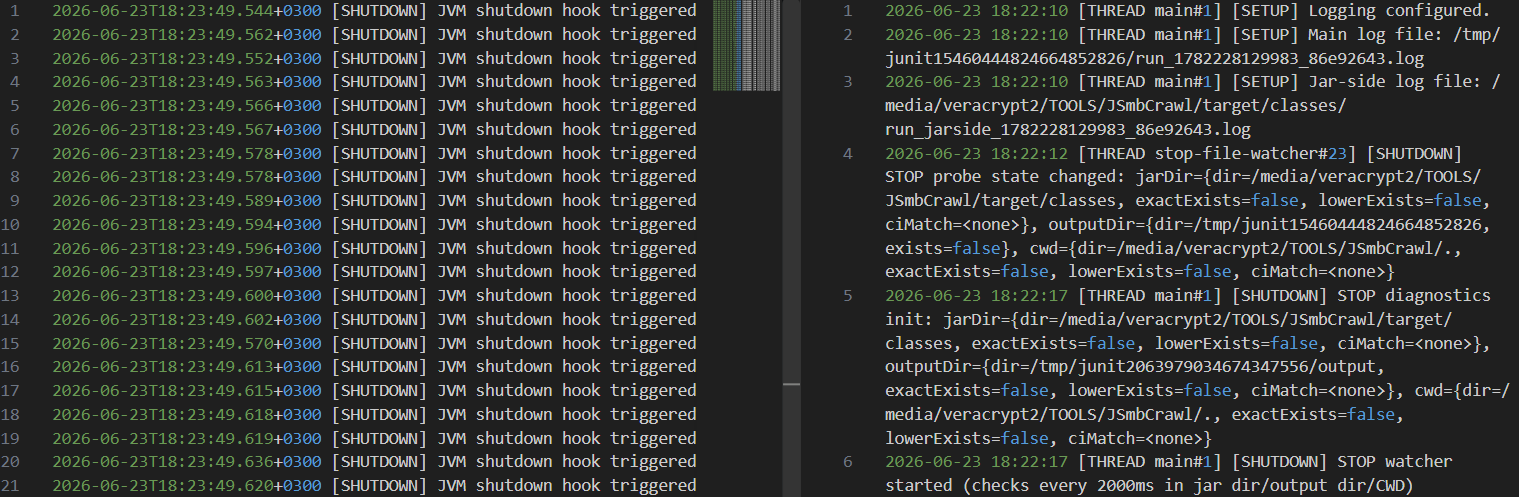
Figure 20: The developer's test logs bundled inside `jl60.jar`, with the UTC+3 timestamps and the VeraCrypt build path
The two August builds, nv644 and nv647, share one build stamp and are the same source built twice through an obfuscator labeled as POC-Aidsfuscator-v2.9.0, and they are the SMB engine alone, signing in to Windows file shares with a password or an NT hash and uploading to OneDrive through Microsoft Graph. Token broker theft, Continuous Access Evaluation replay and the Edge user agent first show up in jtkn7 and jtkn8, a standalone SharePoint downloader built on October 7 in two versions 47 minutes apart, which decrypts a user's cached tokens with DPAPI, refreshes them, and pulls SharePoint libraries with a cap of 900 GB and five million files set in the configuration file stored beside it. The two lines merge in nv68 on October 8, together with SharePoint mode, a staging cap and rate-limit back-off, and a structural check of every roughly 11 MB archive from nv68 onward shows the SMB engine and the token-driven SharePoint downloader living in one tool. nv68, nv69 and nv75 were built about 27 hours apart from first to last, and a 17-day gap follows before v77.
From v77 on, new builds come every few days, starting with v77 on October 26, which adds the SharePoint write probe. v81, the build described above, downloads SharePoint files of 4 MB or more after the small files and keeps them in a separate SPO.deferred-large folder, and it uploads them only after the small files have gone out in ZIP archives. The SMB side already deferred large files in the August builds, so v81 brings the same idea to SharePoint downloads. v82, built the same day as v81, adds a fallback that carves tokens out of cache entries its parser cannot read. v83, built on October 29, adds the separate SharePoint write-test mode (writetestspo) and incremental collection, which skips paths copied in earlier runs.
v85 is the latest build we have, built on November 3 at 10:49 UTC, and it changes how a run starts and stops. When a run starts, v85 first uploads anything an earlier run left in SPO\ and SPO.deferred-large\, while the new SharePoint listing runs at the same time. During a run, it checks downloadlist.txt for changes and picks up new entries without a restart, and when a STOP.txt file appears, it lets a large upload that is already in progress finish before it exits.
The Ransomware Inside BrokerSiphon
The JAR that was staged next to the ransom note is the encryptor, and it is also the oldest BrokerSiphon build we hold, which tells us a lot about how this TA treats their tooling, because the same program that maps and steals files can encrypt them with the operator's key and leave a note in every folder, and the only difference between those jobs is a handful of configuration values.
jl60.jar (SHA-256 4bea30904287fae522aafa7e8dfccf0f0777a96c85f7da76a33c547fe6fbd7fa) is a self-contained Maven JAR that bundles jcifs-ng 2.1.10, smbj, BouncyCastle and gson 2.10.1 next to its own code, and none of it is obfuscated. It comes from the same Maven project as every later build, com.example:smb-crawler, and its main class is org.example.V2_JavaSmbCrawler. It was built with JDK 21 but compiled to run on Java 8 or later, its BuildInfo class carries the build ID 20260623-152148594, which dates it to June 23, 2026 at 15:21 UTC, and its startup log calls it App v26. The key check also has the same developer typos we found in v81, an error message reading expectedSha256 mism@tch and a parameter named expectedSh256, which points to the same developer behind the June encryptor and the October theft tool, just as the shared Maven project name does.
The Staged Package
The staged package holds six files: config.txt, the ransom note as writetest.txt, an RSA-2048 public key as punkey.txt (a typo), a paths file, the same key again as pubkey.txt, and v60.zip holding jl60.jar. jl60 only ever looks for a file named pubkey.txt, so the typo copy would have stopped the run at the key check, which is most likely why the same key was staged a second time under the right name. The key's DER bytes hash to the expectedSha256 value in the configuration, so the configuration and the key are a matched pair, and the paths file holds two recursive local targets, local://s:\** and local://R:\**.
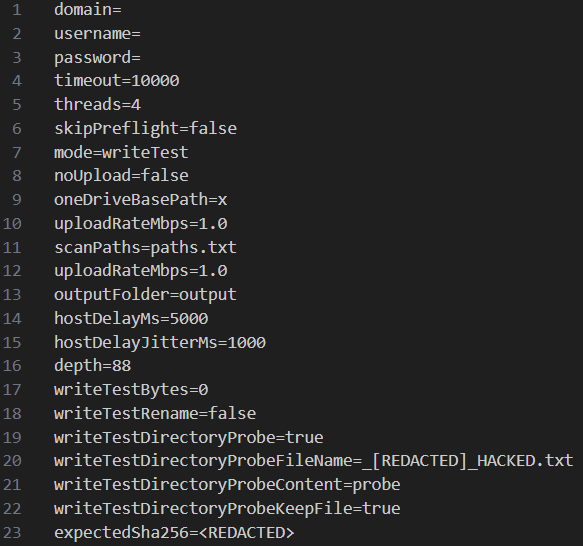
Figure 21: The staged `config.txt` with the write-test keys and the `scanPaths` setting that points to the paths file (marker file name and key hash redacted)
How a Write-Test Run Starts
The configuration value mode=writeTest is lowercased on load, and jl60 treats writetest as a listing-style mode that never authenticates to OneDrive or Google Drive, so this mode uploads nothing and the configuration's noUpload=false has no effect on it. The run waits 5 seconds before it initializes ([INIT] Delay 5s before init), and from setup onward a watcher thread checks every 2 seconds for a STOP.txt or stop.txt file in the JAR folder, the output folder and the working folder, which gives the operator a clean way to abort the encryptor at any point, including during that pause. During initialization the run then has to pass a key check, in which jl60 looks for pubkey.txt in the working directory and then in the JAR folder, parses it as a PEM or bare base64 public key, and refuses to continue with an IllegalStateException unless the SHA-256 of that key matches expectedSha256 in the configuration.
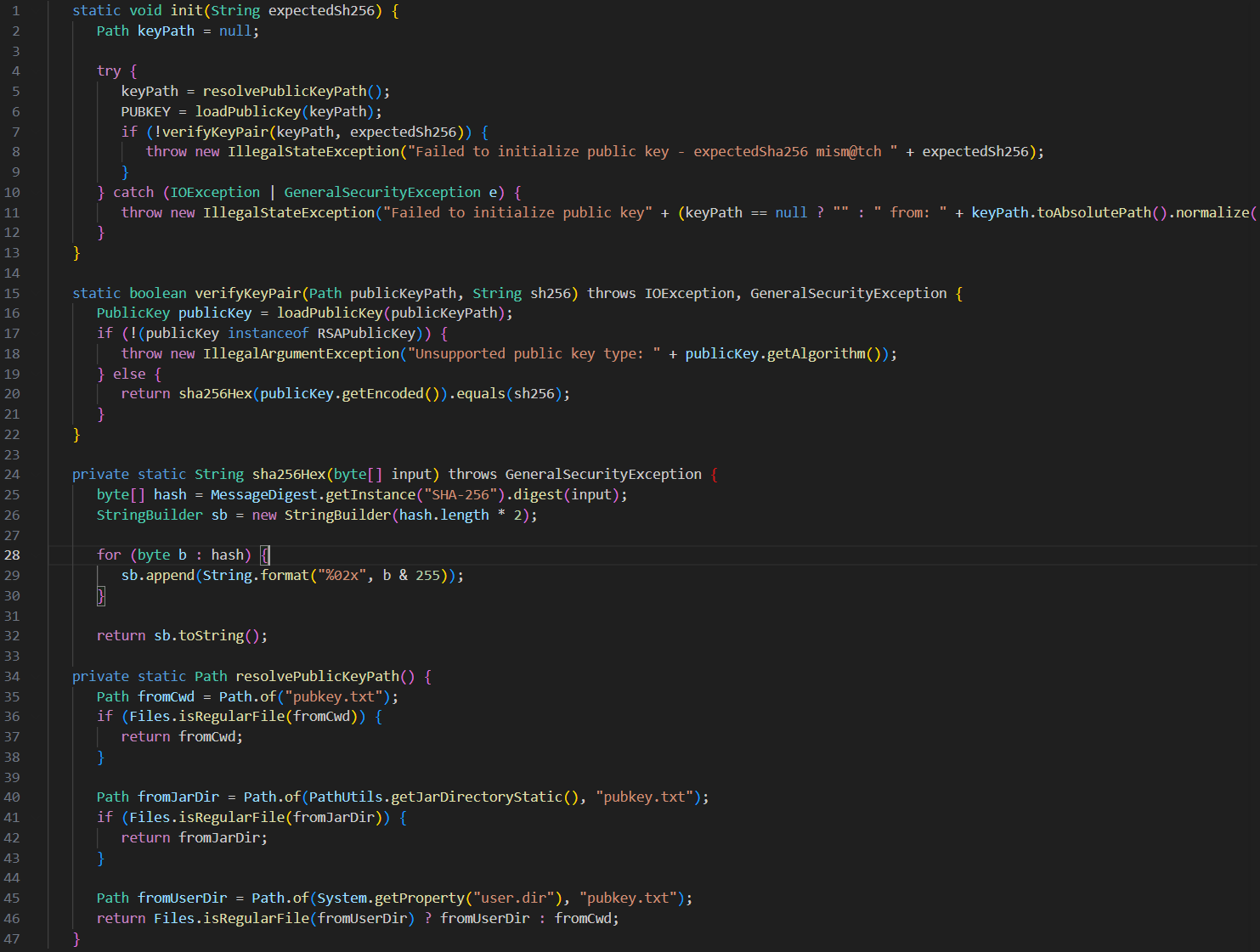
Figure 22: The `AC` key check, which finds `pubkey.txt` in the working directory or the JAR folder and compares its SHA-256 with `expectedSha256`, failing with the developer's `mism@tch` error
The paths file decides what kind of run this is, because jl60 handles SMB targets and local targets in different branches. For a path given as an SMB target, it reads the first bytes of each file and writes the same bytes straight back, so on SMB the write test really is only a write test. That branch also needs a domain password in clear text, because its SMB library cannot sign in with an NT hash. For a path given as local://, it needs no domain credentials at all and encrypts the start of each file instead. The staged paths file uses local://s:\** and local://R:\**, and S: and R: are drive letters that usually point at mapped file shares. Nothing in jl60 requires these two letters, so the operator most likely picked them for the host the package was aimed at. Whatever those drives map to on that host is walked with the access of the account running the tool, and the files there go to the branch that can encrypt them rather than the one that only writes the same bytes back. The staged configuration itself switches the encryption off, as we explain under What the Staged Run Would Do.
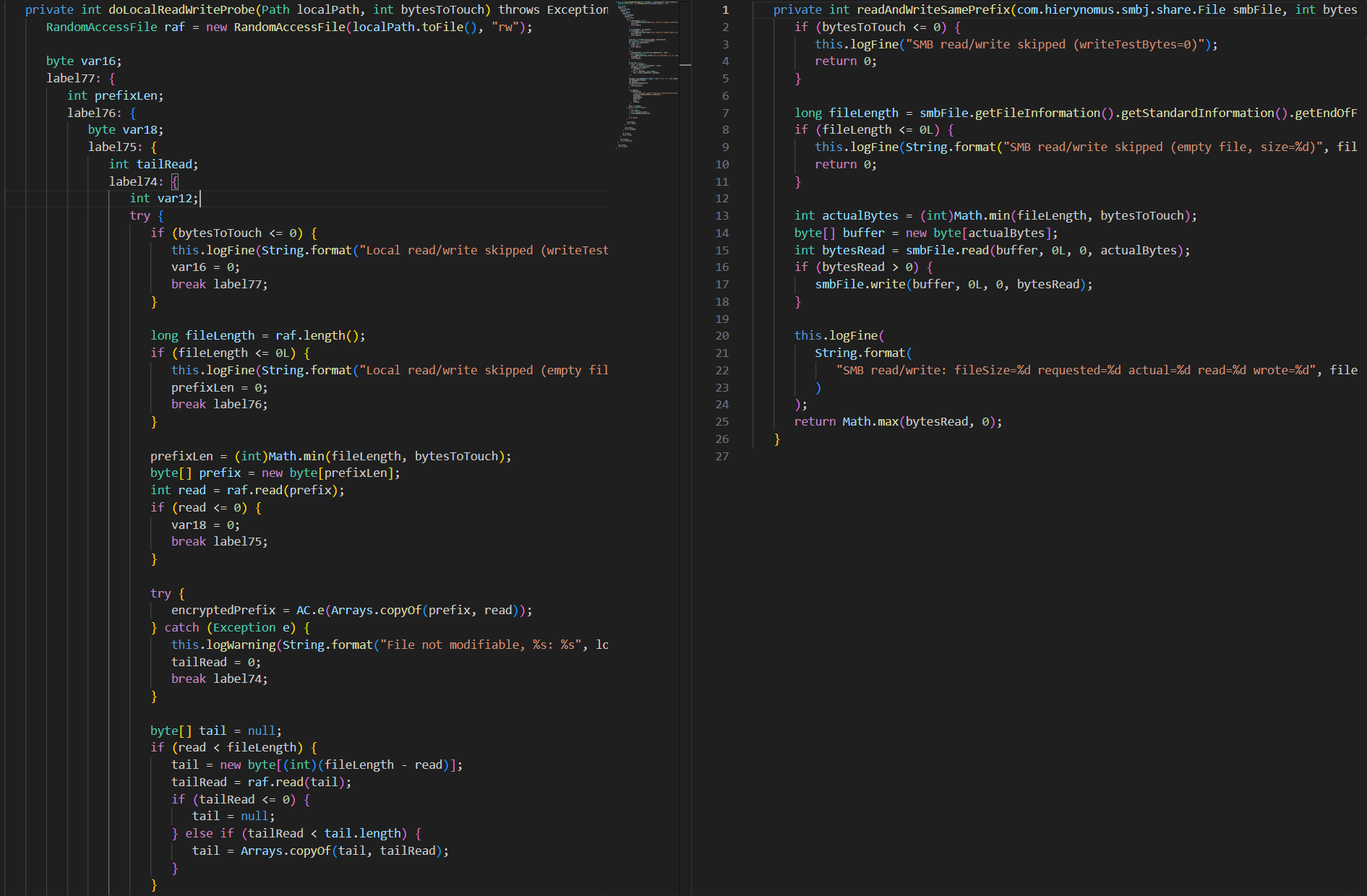
Figure 23: jl60's two write-test branches side by side, where the local branch (`doLocalReadWriteProbe`) encrypts the start of each file through `AC.e`, while the SMB branch (`readAndWriteSamePrefix`) writes the same bytes straight back
The local walk recurses down to the configured depth (88 in the staged configuration), runs on four worker threads, and skips any folder or file whose path contains one of a built-in list of words, including appdata, programdata, windows, winsxs, program files, $recycle.bin, system volume information, temp, tmp, netlogon and sysvol. That keeps the operating system and the tool's own install folder under ProgramData intact, and because it is a plain substring match, it also skips anything with a word like temp or windows anywhere in its path, such as a Templates folder. Apart from the note marker itself and files that already end in .enc, nothing else is filtered, because the extension blacklist and date rules BrokerSiphon applies when uploading do not apply to write-test runs, so documents, images, archives, databases and executables in the target folders are all processed, and every file the run reaches is also written to a listing file in the output folder with its full path and size. Every run also leaves its own trail on disk, with a jsmbcrawl_startup.log in the JAR folder, the working folder and %TEMP%, a run log in the output folder and a second copy next to the JAR (named run_jarside_*.log in the developer's own leftover runs), and log lines tagged [WRITE-TEST] that include a progress line every 30 seconds.
Encrypting a File
For every file it reaches, the local branch reads as many bytes from the start of the file as the writeTestBytes setting asks for, which defaults to 1 when the key is missing from the configuration and is capped at 4,096. The AC class generates a fresh AES-256 key and a random 12-byte IV for that file, encrypts the prefix with AES-256-GCM, wraps the AES key with RSA-OAEP (SHA-256 with MGF1) under the operator's public key, and serializes the result as a version byte of 1, the wrapped key's length and value, the IV, and the ciphertext's length and value with its 16-byte tag. The tool then reads the rest of the file into memory, resizes the file, and writes the encrypted block followed by the untouched remainder, so every encrypted file is rewritten from start to finish even when only a single byte of it is encrypted. AC has no decrypt function anywhere, the per-file AES key only exists inside the RSA-wrapped block, and only the holder of the operator's private key can put the original bytes back.
Because the wrapped key for an RSA-2048 public key like the staged one is always 256 bytes long, an encrypted file grows by exactly 293 bytes and starts with the bytes 01 00 00 01 00. When writeTestRename is on, each encrypted file is also moved to the same name with .enc appended and never moved back, even though the tool's own debug messages call this a round trip, while the SMB branch performs a legitimate rename and restore through a temporary name ending in .jsmbcrawl_writetest_ followed by the JVM's nanosecond counter value. Files that already end in .enc are skipped, so a second run leaves encrypted and renamed files alone, although a file that was encrypted without the rename would get encrypted again.
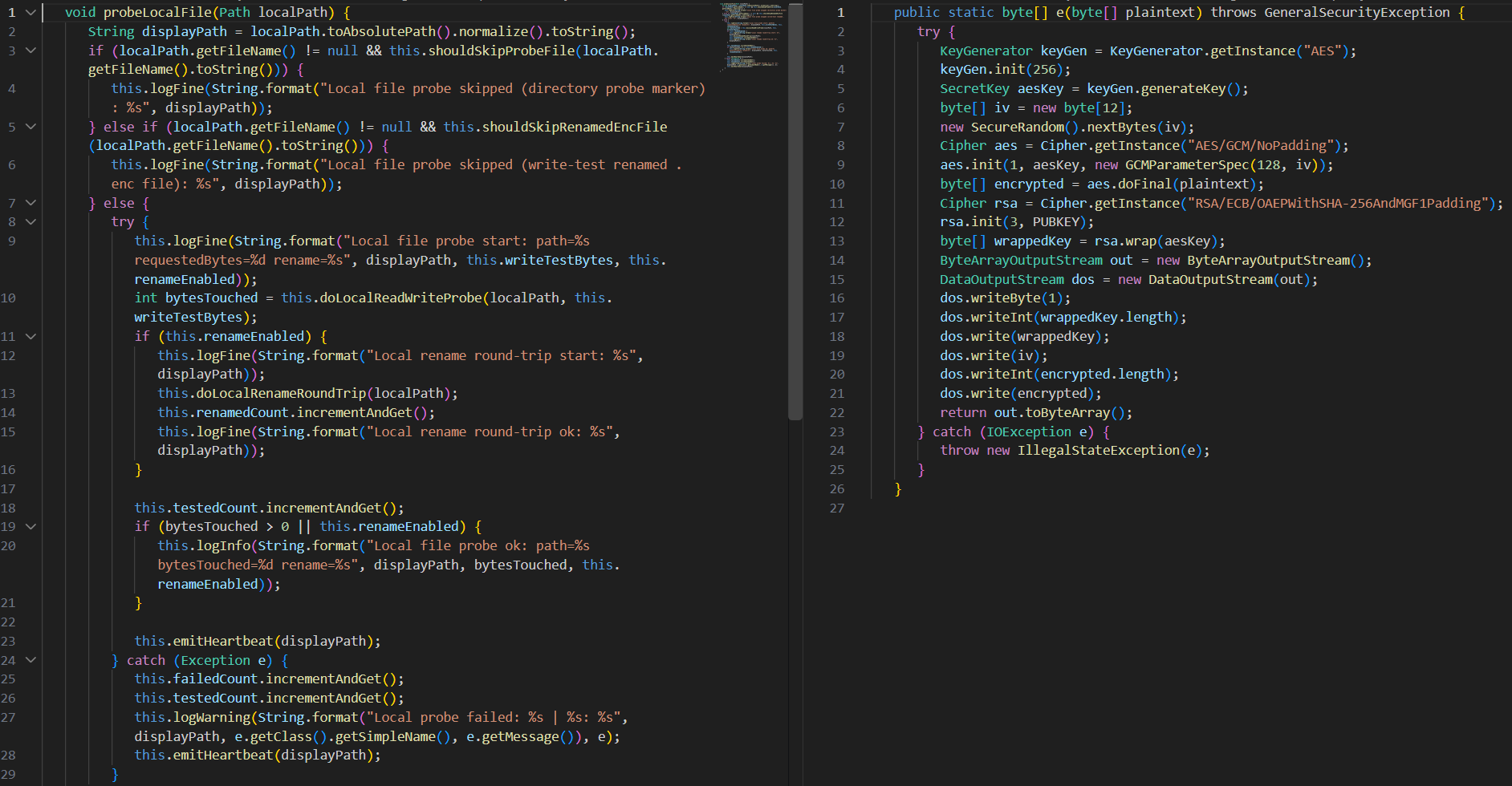
Figure 24: The local-file branch of `WriteTestModeHandler` and the `AC` envelope that encrypts the first bytes of a file with the operator's key
Dropping the Note
The ransom note goes out through the write test's directory probe, because when writeTestDirectoryProbe is on, jl60 creates a marker file in each directory as it walks into it, before handling that directory's files, and keeps it there when writeTestDirectoryProbeKeepFile is true, which is also the default, while a marker that already exists is left alone so repeated runs do not pile up duplicates. The marker's content comes from Config.loadJarSideWriteTestContent, which reads a file named writetest.txt from the JAR's own folder and uses up to 4,096 characters of it, falling back to the configured content (the default is JSmbCrawl write-test OK) only when that file is missing or unreadable. The ransom note in the package is named writetest.txt and is 2,629 bytes, comfortably under that cap, the marker name in the staged configuration ends in _HACKED.txt, and the marker file itself is excluded from encryption, so the note stays readable in every directory the run reaches. Later builds read the same marker content from a file named probe.txt instead, with the configuration keys renamed to probewrite and probeDir*, which is why this package was paired with the June build.
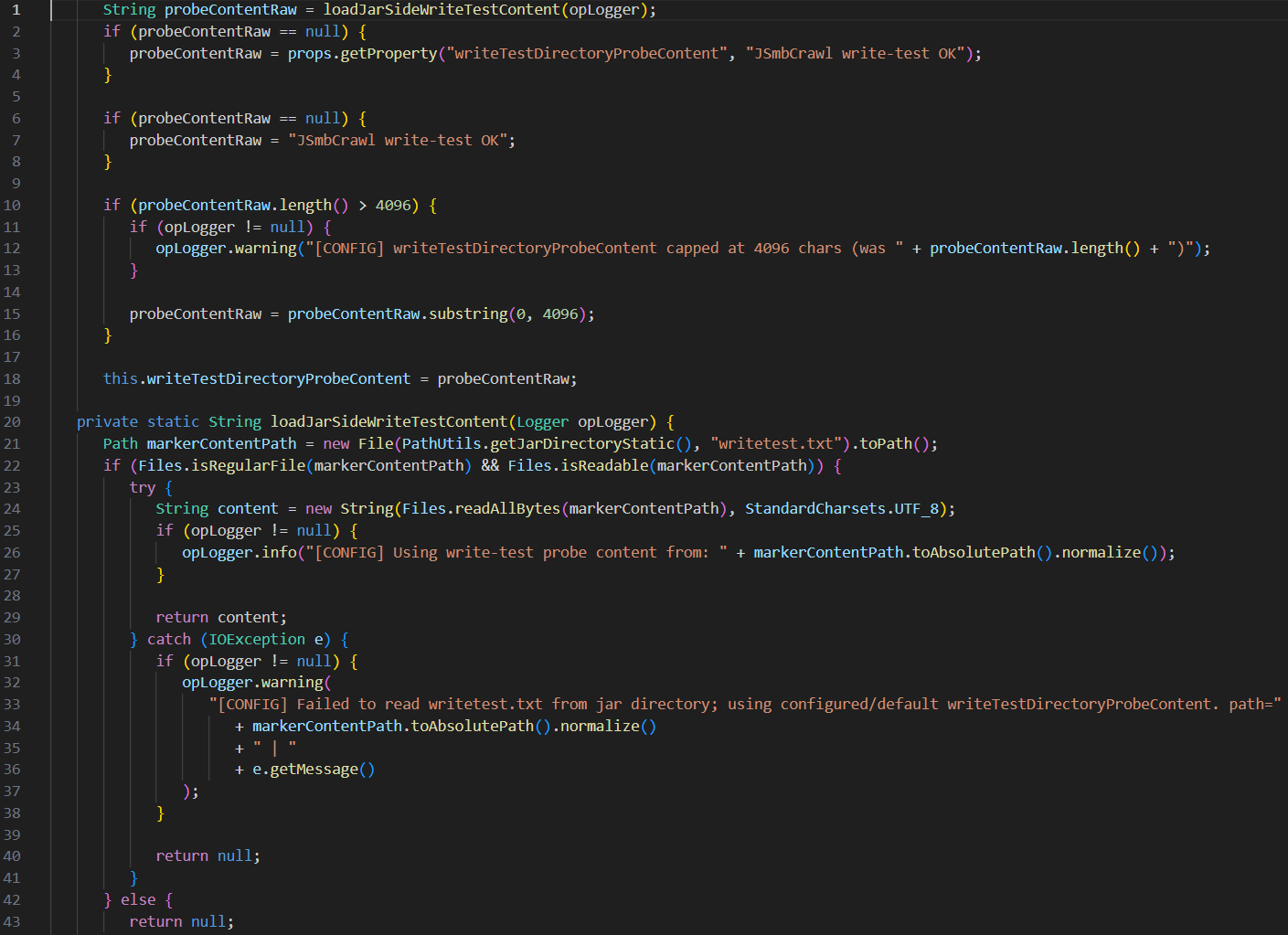
Figure 25: jl60's `loadJarSideWriteTestContent` reading `writetest.txt` from the JAR folder, capped at 4,096 characters, with the configured content as the fallback
As staged, the configuration turns the encryption off and keeps the note on, because writeTestBytes is 0 and the directory probe options are on, so the run would walk S:\ and R:\, list every file and leave the ransom note in every folder without damaging a single file. That matches the note's own claim that the data was stolen rather than encrypted. We do not know why the encryption is off, but turning it on takes one line in config.txt, since leaving writeTestBytes out makes it default to 1, and a value up to 4,096 with writeTestRename=true leaves every file encrypted and renamed to .enc. The operator has already fixed one mistake in this package by staging the key again under the right name, so a new config.txt that switches the encryption on could follow at any time.
The Note and The Gentlemen
The note has a 32-character data ID and it opens with "Gentlemen, your confidential data has been exfiltrated", then claims full network access and theft of financial, customer, employee and intellectual property data, offers file samples, and threatens publication on a leak blog with a 239-hour timer, plus reports to regulators. Its onion address, the 239-hour timer, the SimpleX mention and the X handle TheGentlemen26 all match public ransom notes of The Gentlemen ransomware operation, and the address it gives, 193.143.1[.]142, was serving a challenge page in late October and early November. The Tox ID matches none of the published note variants, each of which carries its own different Tox ID, and this note claims theft only, where all published variants say the network is encrypted or under the attacker's control. Someone also swapped a Cyrillic С into the word CONTACT, which is the kind of thing you only catch when you compare the text character by character.
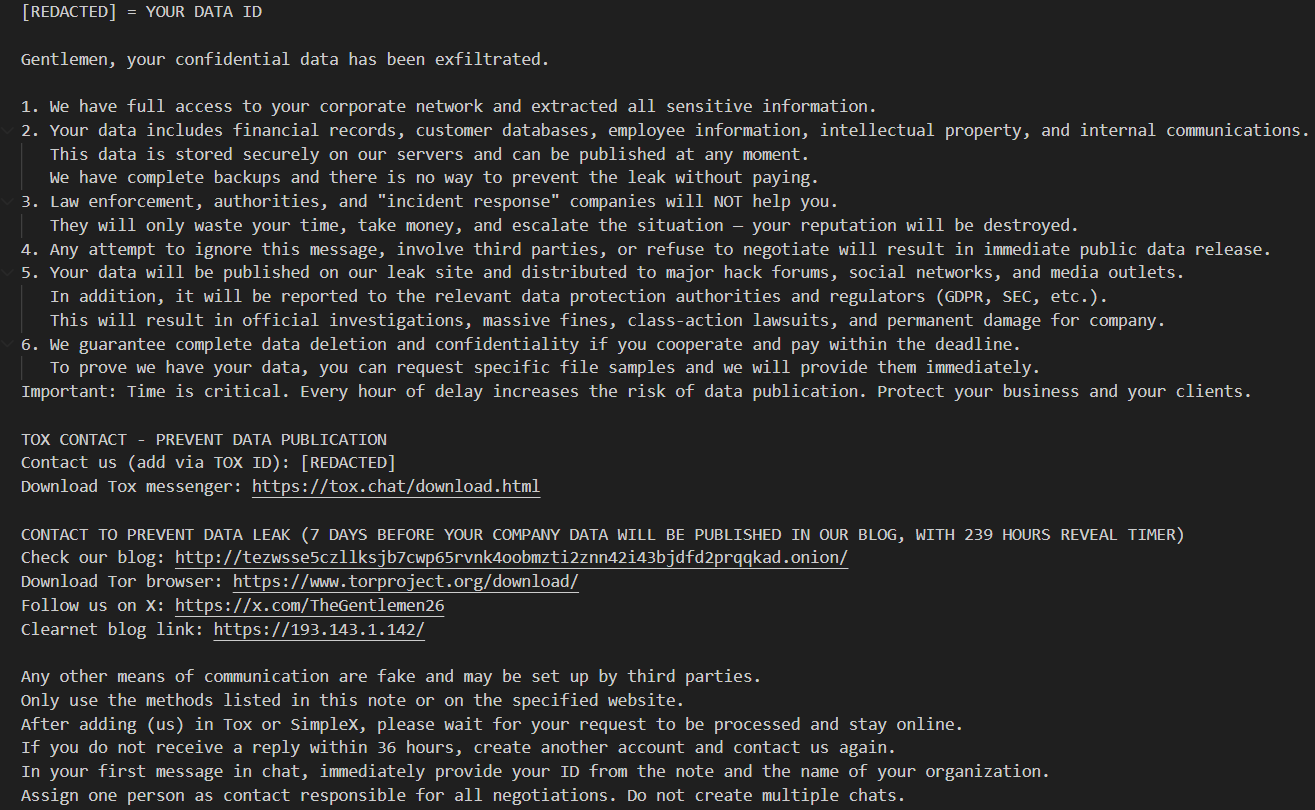
Figure 26: The staged ransom note, opening with the Gentlemen line and listing the Tox contact, the onion site, the X account and the clearnet address (victim data ID and Tox ID redacted)
We assess with moderate confidence that the threat actor behind Nimbus RAT and BrokerSiphon is a Gentlemen affiliate that brings its own access and its own tools, keeps building new versions of them, and uses the group's note and leak site for the extortion step. The note points at the group's current infrastructure, its onion leak site, clearnet front and X account, and its Tox ID matches none of the published note variants, which fits an affiliate using its own contact. The access method also fits an affiliate better than the group itself, because public reporting on The Gentlemen describes entry through edge-device exploitation, VPN access, valid credentials and access brokers, and we found nothing tying the group to Teams vishing.
A Separate Campaign: A Deno Backdoor Behind a Fake Windows Update
While working on this research we also took apart an unrelated sample that has nothing to do with Nimbus RAT or BrokerSiphon, and it gets a section of its own because it builds a complete remote access toolkit out of a legitimate, signed runtime and four scripts. The sample is a 49 MB ZIP archive (SHA-256 bc0debf3fb46b63c18249a671937cb9a647ad2f1c0965f581f310deef5b04c35) named kb4960923.w to look like a Windows update package. Inside are five files: a 128 MB executable named 4960923_9113.exe and four small JavaScript files with random names.
The executable is not malware at all, but a legitimate build of Deno 2.7.14, the open-source JavaScript and TypeScript runtime, signed by Deno Land Inc. with a valid signature and nothing appended after it, renamed to match the update theme. Everything malicious lives in the four scripts, which the bundled runtime runs with exactly the permissions each one needs, and because Deno comes with networking, a web server, a WebSocket client and process control built in, the operator gets a complete remote access toolkit without dropping a single unsigned binary.
Below is what stands out in this build and what defenders can look for:
- Four scripts with random names,
sqnzlbaa0.js,0zxy6qm4.js,wyi51iyvl0f.jsandh3muw2i8eu.js, each running in its own Deno process. - Local services on
127.0.0.1ports 21, 22 and 23, the ports normally used by FTP, SSH and Telnet. - A Run value that starts Deno through
conhost.exe --headless. - Two WebSocket C2 backends, one on Amazon CloudFront and one on Azure Front Door.
- A command runner with a full file manager, a Windows version query and a generic remote command.
- A domain generation fallback over Amazon S3, protected by AES-CTR and an Ed25519 signature, that is fully written but switched off.
How It Runs
The launcher, sqnzlbaa0.js, asks Deno for its own path and starts three more copies of the runtime from the same folder, each with only the permissions its job needs: 0zxy6qm4.js with --allow-net, --allow-env and --unsafely-ignore-certificate-errors, wyi51iyvl0f.js with --allow-net alone, and h3muw2i8eu.js with --allow-net, --allow-read, --allow-write and --allow-run. Splitting the backdoor this way means only the C2 client can read environment variables and ignore certificate errors, only the command runner can touch the disk or start programs, and the tunneler gets nothing but network access, which is a smart design choice that also spreads the activity across three processes for anyone trying to piece it together. All four scripts use the same string-array rotation obfuscation, which moves the scripts' strings, including the names of the Deno APIs they call, into a shuffled lookup table.
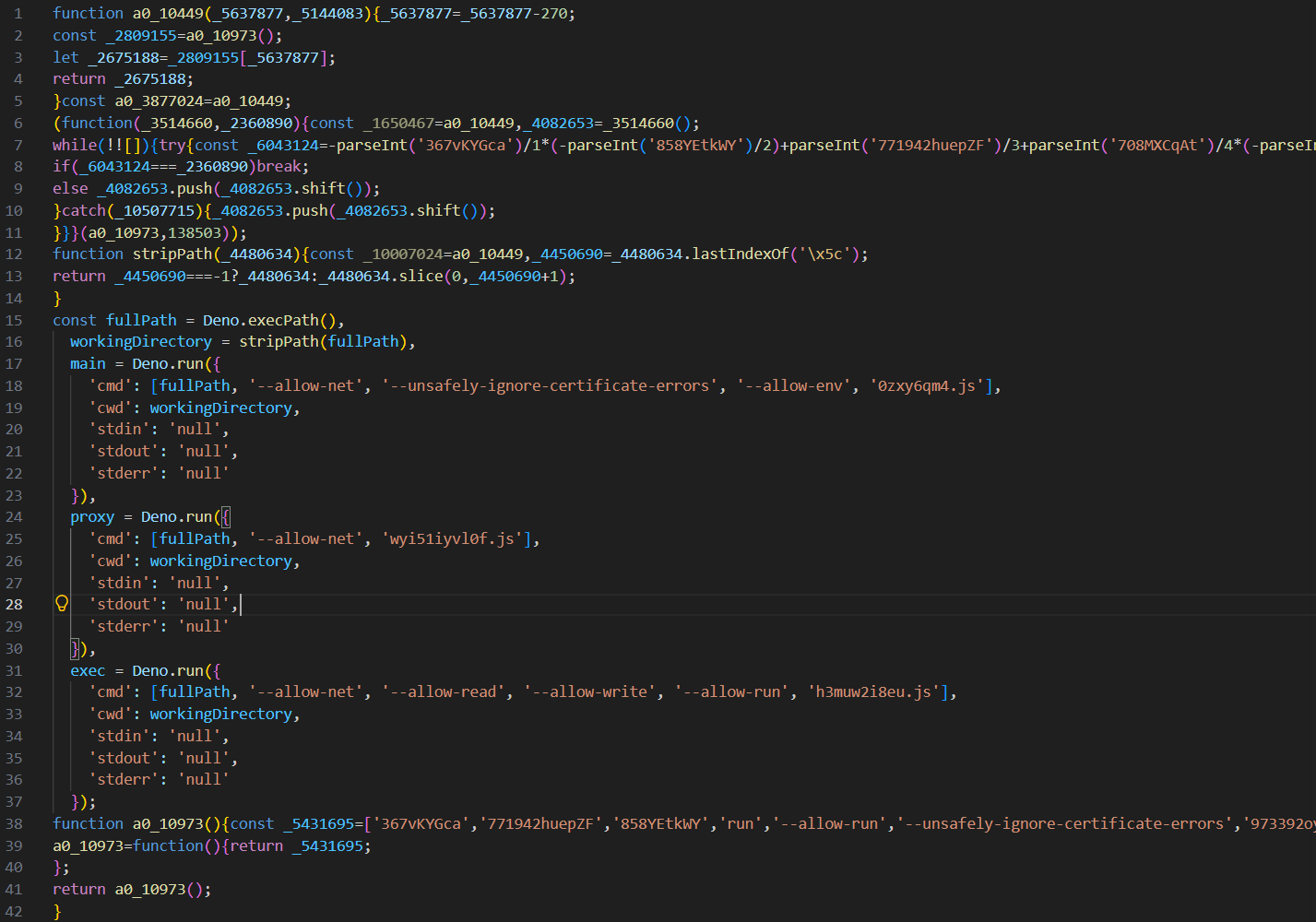
Figure 27: The deobfuscated launcher starting three Deno processes, each with its own permission flags
Talking to the C2
The C2 client, 0zxy6qm4.js, opens a WebSocket to wss://d3nvgvjhsjswi0.cloudfront[.]net/api/connect, and once it has failed more than seven times in a row it switches to wss://fd-cjacaub0bcbrhzhs.z01.azurefd[.]net/api/connect and keeps rotating between the two. Reconnects wait about 10 seconds for the first three failures, a minute up to the tenth, and ten minutes after that, each with up to 50 percent random jitter on top, and because the client runs with --unsafely-ignore-certificate-errors, it accepts whatever certificate the other end presents. On connect it sends its version, 1.010.10.10, together with the Windows product name, display version and build number, then registers the domain, user name, computer name and a random 32-bit install ID, and immediately pushes the output of set, ipconfig /all and tasklist to the operator.
The build also contains a fallback that is fully written but switched off. On every fifteenth failed attempt, the client is meant to turn an HMAC-SHA256 key and the current day number into an S3 bucket name of 8 to 12 characters in one of four US AWS regions, download info.dat from that bucket, decrypt it with AES-CTR under a key and IV derived through HKDF, and check a 64-byte Ed25519 signature over the result before trusting the domain inside. In this build both HMAC keys and the Ed25519 public key are empty strings, so the fallback returns nothing and the client never leaves its two hardcoded backends, but the code shows the developer preparing a signed, daily rotating rendezvous that taking down the two CDN endpoints would not stop once the keys are filled in.
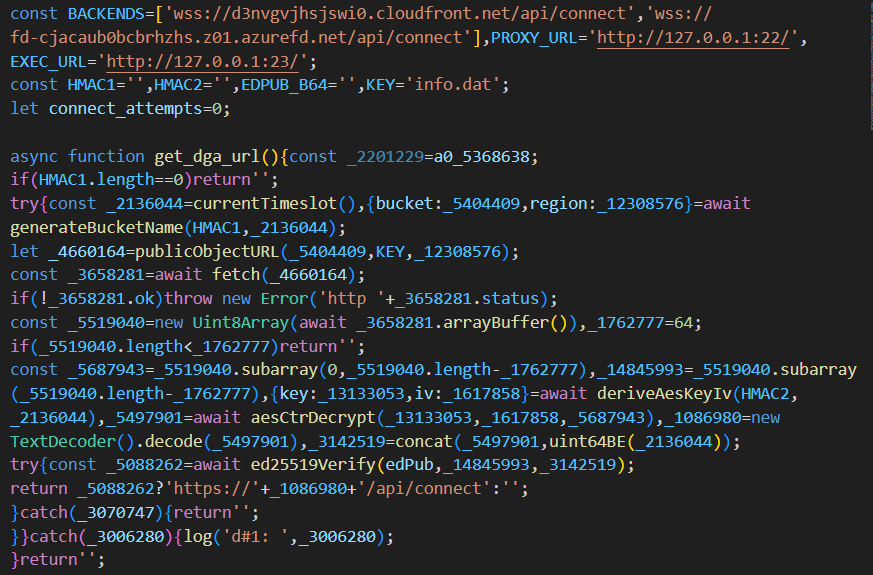
Figure 28: The C2 client's two WebSocket backends and the S3 domain generation fallback, which returns straight away because its keys are empty
The C2 sends commands as base64-encoded JSON whose field names imitate the payment, subscription and push notification traffic of an ordinary web app:
payment_statusruns one ofwhoami,set,ipconfig /all,route printortasklistand returns the output.subscription_id, withsubscription_hostandsubscription_port, has the tunneler open a TCP connection to any host and port, after whichdataandindexfields carry traffic through it, andunsubscribecloses it again.webpushruns an arbitrary command line throughcmd.exe /cand returns its output.mathdrives a file manager whose operand selects listing a folder with timestamps and sizes, listing drive letters, writing a file from base64, reading a file back as base64, creating a folder, moving or renaming a file, or deleting one.handshakewith a value of1installs persistence, and a value of2removes it.
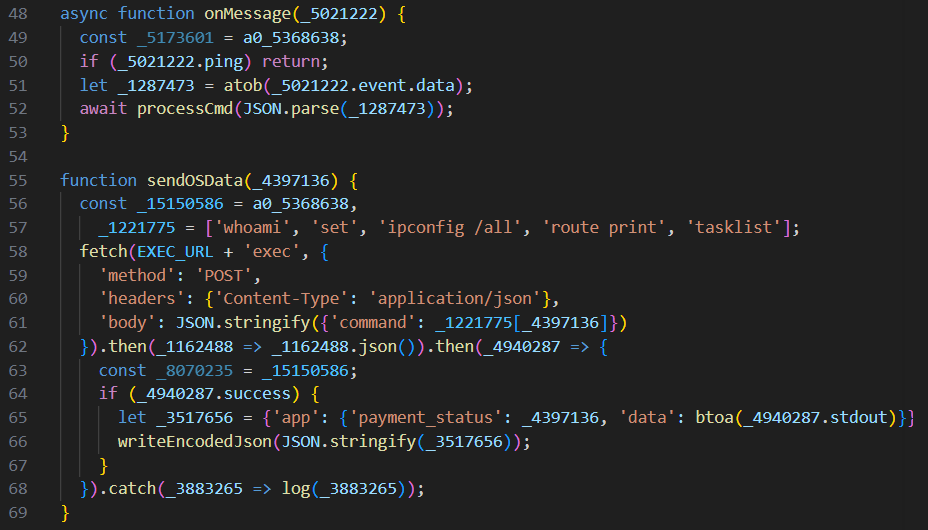
Figure 29: The deobfuscated command dispatcher with its payment, subscription, `webpush`, `math` and `handshake` branches
Tunneling, Commands and Persistence
The tunneler, wyi51iyvl0f.js, listens on 127.0.0.1:22 and exposes /connect, /send and /closesocket, and every chunk of up to 4 KB that it reads back from a remote host is posted to http://localhost:21, where the C2 client relays it to the operator over the WebSocket. That gives the operator a reverse tunnel into anything the infected machine can reach, built entirely from Deno's standard networking calls. The command runner, h3muw2i8eu.js, listens on 127.0.0.1:23 and serves /exec, which runs commands through cmd.exe /c, /fs for the file manager, and /osver, which reads the Windows version out of the registry with reg query.
Persistence is a single reg add command that writes a Run value named 7jagyqpire98 under HKCU\Software\Microsoft\Windows\CurrentVersion\Run, launching conhost.exe --headless with the Deno runtime and --allow-run against an app.js in the install folder, while handshake 2 deletes the same value again. The headless console host keeps any window from appearing, and the app.js it points at is a name that none of the files in this package carry, since the launcher here is sqnzlbaa0.js.
No Link to the Nimbus Case
Nothing in this sample connects it to Nimbus RAT or BrokerSiphon, since it uses a different runtime, a different C2 design on different providers, and shares no keys, accounts, file names or infrastructure with anything in the Nimbus case. The defensive advice below still covers it, because what catches it is the same kind of process context: a signed runtime running out of a user folder, loopback listeners nobody expects, and a headless console host starting it at logon.
Detection
These are the behavioral indicators we would alert or hunt on, grouped by where you will see them.
Endpoint
javaw.exeorjava.exerunning fromC:\ProgramData\<folder>\jdk-*\bin\or any JDK outside Program Files, and a Startup folder shortcut that launches one (such asMicrosoft Edge.lnk, so check the target of any shortcut with a familiar name).- A
terms.txtof any size in the bin folder of any JDK,%TEMP%\internal.lockheld by a Java process, and JAR files in%TEMP%\libs\. - A Java process making Google Drive API calls (
www.googleapis.com,oauth2.googleapis.com) every 45 to 75 seconds, or fetchingdocs.google.com/spreadsheets/d/<id>/export?format=csv. - Any process other than the Teams client contacting
*.relay.teams.microsoft[.]com, especially a Java process that opens a listening socket and connects to a Teams relay on TCP port 443 within a fraction of a second, and%TEMP%\webrtc-java-windows-x86_64<digits>.dllappearing on disk. - A Java process connecting to SMB port 445 on many internal hosts, or to Kerberos and LDAP ports on domain controllers, together with failed network logons from the same workstation.
- A Java process starting another
javaw.exe -jarfrom ProgramData, andcmd.exe /c timeout /t 2 & RD /S /Qas a child ofjavaw.exe. - Non-system processes reading
.tbresor.tknfiles under%LOCALAPPDATA%\Microsoft\TokenBroker(includingCache\), andtokens.txt,xfer_done.txt,journal_<13 digits>_<8 hex>.logortemp_<13 digits>_<8 hex>\archive_NNN_*.zipunder ProgramData. - A Java process creating an
SPO.deferred-largefolder, apeer_journal_*.logfile next to a JAR, or aboot_trace.logfile next to a JAR or in the temp folder. pubkey.txtorprobe.txtnext to a JAR under ProgramData.- Files that start with the bytes
01 00 00 01 00and grew by exactly 293 bytes (the signature with an RSA-2048 operator key like the staged one), a burst of files renamed to*.enc, and temporary names ending in.jsmbcrawl_writetest_<digits>on file shares. jsmbcrawl_startup.login a JAR folder, the working folder or%TEMP%,run_jarside_*.lognext to a JAR, and log lines tagged[WRITE-TEST].writetest.txtnext to a JAR, and one new file name appearing in many directories of a file share within minutes, especially a name ending in_HACKED.txt.- A non-browser process sending requests to
graph.microsoft.comor a SharePoint host with a browser user agent, especially an Edge build older than the one your organization uses. deno.exe, or a renamed Deno binary, started byconhost.exe --headlessor running from a user or temp folder with--allow-net,--allow-runor--unsafely-ignore-certificate-errorson its command line.- A Deno process listening on
127.0.0.1ports 21, 22 or 23. - A Run value under
HKCU\Software\Microsoft\Windows\CurrentVersion\Runwhose command starts withconhost.exe --headlessfollowed by a Deno runtime and--allow-run.
Microsoft 365 and Entra ID
- Bulk
FileDownloadedevents in SharePoint and OneDrive audit logs under first-party client application IDs (Teams, Office, Outlook Mobile) with a user agent that does not match the organization's browser versions, andSearchQueryPerformedwithcontentclass:STS_Site. - A single session that searches for every SharePoint site, walks sites and libraries through
/_api/web, and then downloads in bulk. spo-write-test-*.txtfiles appearing in document libraries.- An email bombing wave followed within hours by an external Teams chat or call to the same user.
Network
- Where TLS is inspected, Google Drive API requests whose
User-Agentbegins withInternalDrive. - A process outside the Teams install folder, for example one running from
ProgramData,Downloadsor%TEMP%, holding TLS connections on TCP port 443 to*.relay.teams.microsoft[.]comor other Microsoft Teams relay addresses, which is how a SOCKS5 tunnel over Teams relays shows up on the network. - A Deno process opening WebSocket connections to
/api/connecton CloudFront or Azure Front Door hosts.
What Defenders Should Do
Detection helps, but the cheapest fixes here are configuration changes, and they line up directly with the steps this operator depends on:
- Restrict Teams external access to an allowlist of partner domains, or at minimum block new external tenants and anonymous chat, because every Nimbus RAT case reported so far, including the one we analyzed, starts with an external Teams chat or call after email bombing.
- Remove or restrict Quick Assist wherever a managed remote support tool exists, and make sure the help desk tells users plainly that IT will never cold-call them through Teams and ask them to share their screen.
- Where a compromise is suspected, explicitly revoke the user's refresh tokens and sessions as well as resetting credentials, because depending on how a token was first obtained, a password change on its own does not always invalidate refresh tokens already stolen from the token broker cache.
- Enable token protection and Continuous Access Evaluation for supported apps, since the theft tool's own code expects CAE challenges to fail from a different IP address, which is one reason it runs on the victim endpoint, where endpoint telemetry can see it.
- Do not rely on domain blocking for this family, because its C2 is Google APIs and its tunnel is Microsoft Teams relays, and process-level context on the endpoint is what separates it from legitimate traffic.
Conclusion
What started as one Teams call turned into a look at the threat actor's entire toolkit, from the RAT to the extortion note. The Nimbus RAT developers did more than harden the RAT, because they rebuilt it so it does as little as possible on its own, moved the shell, registry and recon commands into modules that only ever exist in memory, and hid an interactive tunnel inside Teams relay traffic, which Microsoft itself recommends routing around proxies and TLS inspection. BrokerSiphon takes the Microsoft Entra ID sign-in tokens that Windows keeps in its token broker cache for Teams, Office, Outlook and OneDrive, so it never needs the user's password or an MFA prompt. It also goes after recent business documents instead of bulk files and slows down on its own when Microsoft throttles it.
The build history and the staged encryptor show where all of this is heading, with the same operator moving from access to data theft to a staged encryptor and extortion note under The Gentlemen's name within a few months, while it keeps building new versions of its tools.
The Deno backdoor in the separate campaign makes the same point from a different angle, with a signed runtime and four obfuscated scripts doing everything a remote access toolkit needs, which is why the advice above is about process context rather than file reputation.
None of the network indicators here will protect anyone on their own, because the C2 is Google and the tunnel is Microsoft, so process context is what actually can detect this: a JDK running out of ProgramData, a Java process reading the token broker cache or talking to a Teams relay, and an external Teams contact that shows up right after an email bomb. If you only do two things after reading this, lock down external Teams access and Quick Assist, and then go looking for Java running in places where Java has no business running.
How TENEX.AI Responded
Our Detection Engineering team has developed detection rules for the activity described in this research, and we have been hunting customer environments for the same activity, using the indicators and behaviors covered here. When we find evidence of impact, we investigate and reach out to the customer directly.
Appendix A: Indicators of Compromise
Samples
Host Artifacts
Separate Campaign: Deno Backdoor
Appendix B: MITRE ATT&CK
Sources
- Rapid7: "BlackSuit Continues Social Engineering Attacks in Wake of Black Basta's Internal Conflict," June 10, 2025.
- eSentire Threat Response Unit (TRU): "Nimbus RAT: How Threat Actors Are Abusing Microsoft Teams and Google Drive to Deploy a Java RAT," May 28, 2026.
Disclaimer
The information provided in this research is for educational and informational purposes only and does not constitute formal professional advice. While we strive for accuracy, TENEX.AI makes no representations or warranties of any kind, express or implied, regarding the completeness, accuracy, reliability, or suitability of this information. Any reliance you place on such material is strictly at your own risk, and we disclaim all liability for any loss or damage arising from its use. Attribution in this research reflects our analytical assessment of the evidence available at the time of writing and may change as new information becomes available. Indicators of compromise are provided for defensive use only.